Create an online course for free: plan it, record it on your phone, sell it
You don't need a studio or expensive software to make a course. Here's how to plan it, record lessons on your phone, structure modules and start selling, at no upfront cost.
If you know how to do something that other people want to learn, you can turn it into an online course. And you can create an online course for free: no studio, no camera crew, no expensive editing software. A phone, a quiet room and a clear plan are enough to start.
This guide walks you through the whole process: choosing a topic people will pay for, planning your outline, recording lessons on your phone, organising them into modules, and putting the course on sale.
Step 1: Pick a course topic people will pay for
A course sells when it takes someone from a problem to a result. "Photography" is a hobby. "Take product photos with your phone that make people buy" is a result.
Good course topics usually come from:
- Things people already ask you about. Your DMs, comments and calls are full of clues.
- Skills that lead to money or saved time. Design, Excel, selling online, baking for profit, exam prep.
- Something you learned the hard way. Your shortcuts are worth paying for.
Check the demand first
Before you record anything, test the idea:
- Post three short tips on the topic and see which gets the most saves and questions.
- Ask your audience: "Would you join a short course on this?"
- Offer early access at a lower price to the first few people. Real payments are the best proof.
Step 2: Plan your outline
Most beginner courses are too long. People don't want 40 hours of video. They want the shortest path to the result.
Start with the end: what will students be able to do when they finish? Write it in one sentence. Then work backwards and list the steps someone needs to get there.
Turn steps into modules and lessons
Group the steps into 3 to 6 modules (parts), and split each module into short lessons. For example, a phone photography course could look like this:
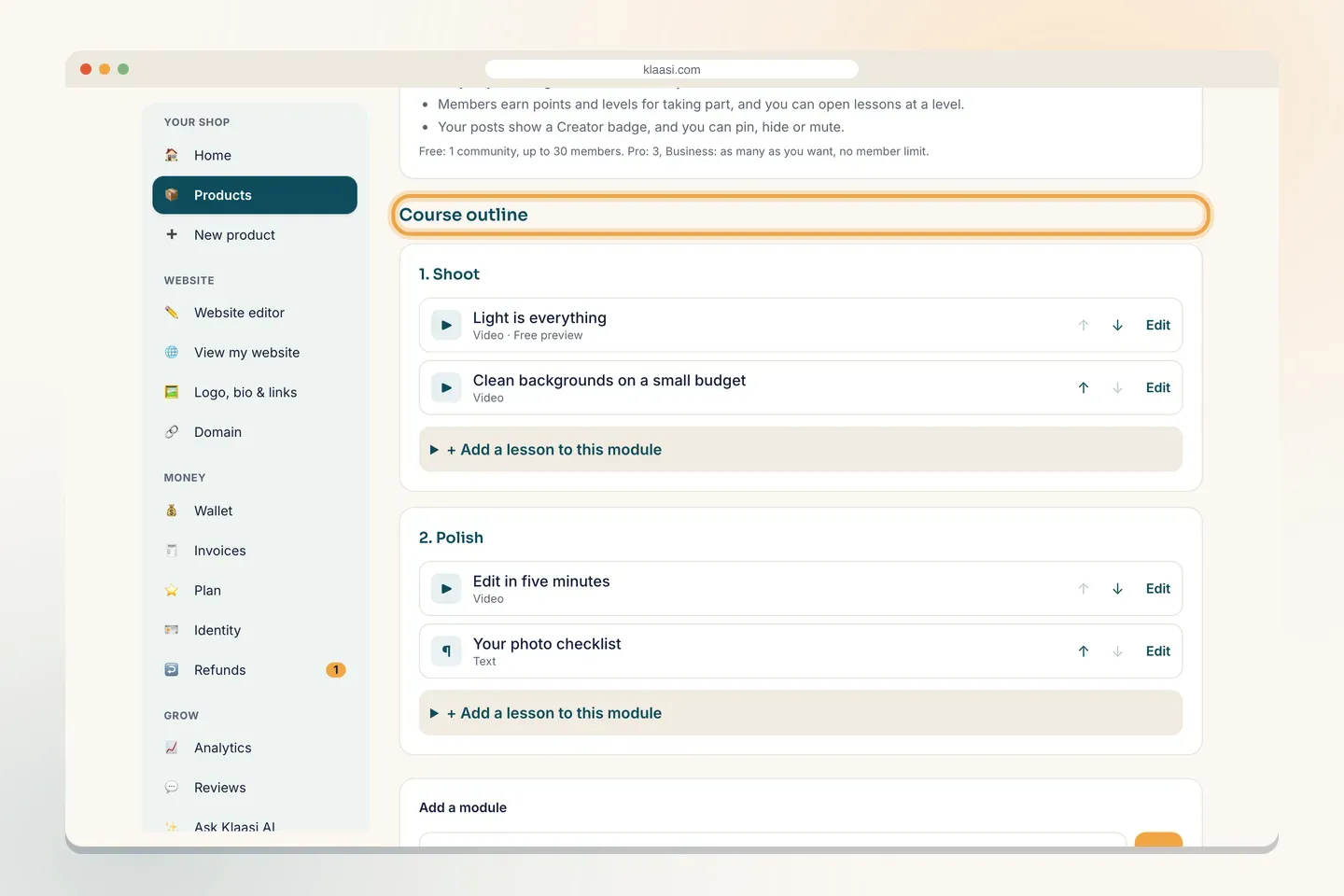
- Shoot: light is everything; clean backgrounds on a small budget.
- Polish: edit in five minutes; your photo checklist.
- Sell: photos that work on Instagram and WhatsApp.
Keep lessons short, usually 3 to 10 minutes, and make each one teach a single idea. Short lessons are easier to record, easier to redo and easier to finish.
Mix lesson types
Not everything needs to be a video:
- Video for showing and explaining.
- Text for checklists, steps and links.
- Quizzes to check understanding.
- Downloads like worksheets and templates.
Step 3: Record lessons on your phone
Your phone camera is good enough. What makes a lesson look and sound professional is light, sound and preparation, not expensive gear.
Light
Sit facing a window during the day. Soft daylight on your face looks better than any cheap ring light. Avoid having the window behind you, or you'll be a dark shadow.
Sound
Bad sound makes people stop watching faster than bad video. Record in a small room with soft things in it (curtains, a bed, clothes) to reduce echo. Turn off fans and generators if you can. A cheap clip-on microphone that plugs into your phone is the best small upgrade you can make.
Framing
- Hold the phone steady: a stack of books or a simple stand works.
- Record in landscape (sideways) for courses watched on laptops, or upright if your students mostly use phones. Pick one and stay with it.
- Keep the camera at eye level.
Screen recordings
If you teach software (Excel, Canva, design), use your phone's or computer's built-in screen recorder. Talk while you click, slowly.
Don't aim for perfect
Write bullet points, not a full script, so you sound natural. If you make a small mistake, keep going. If it's a big one, pause and restart that sentence; you can cut it out later with a free editing app.
Step 4: Edit simply
You only need to do three things:
- Cut the start and end (the part where you reach for the phone).
- Remove long pauses and big mistakes.
- Add a title at the start if you like.
Free phone editing apps can do all of this. Export as MP4 at a normal quality; huge files take longer to upload and don't look much better on a phone screen.
Step 5: Put your course online for free
Now you need a place where students can pay and watch. Look for a platform that:
- Lets you upload videos and organise them into modules.
- Protects your lessons so only paying students can watch.
- Lets you give one lesson away free as a preview.
- Takes payments and gives access automatically.
- Costs nothing to start.
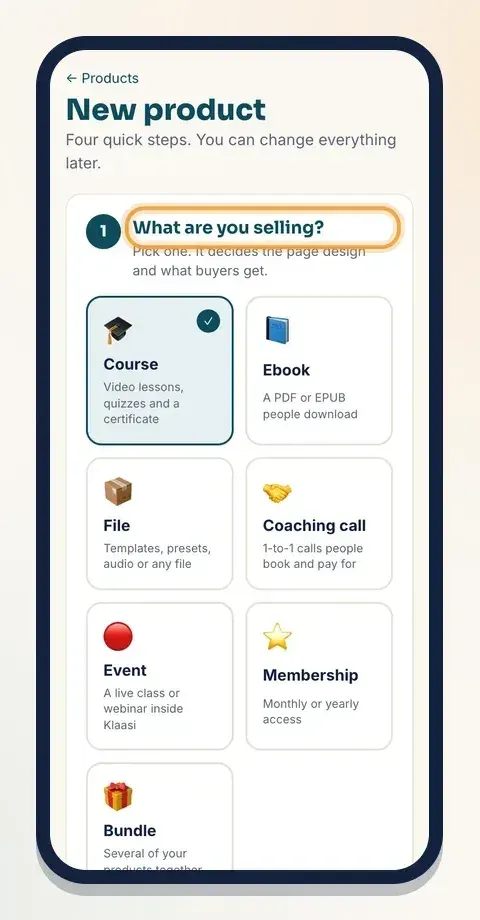
On Klaasi, you can start on the Free plan. You choose Course when you add a product, then build your outline.
In the course builder you add modules, then add lessons to each module. You can move lessons up and down, and mark one as a free preview.
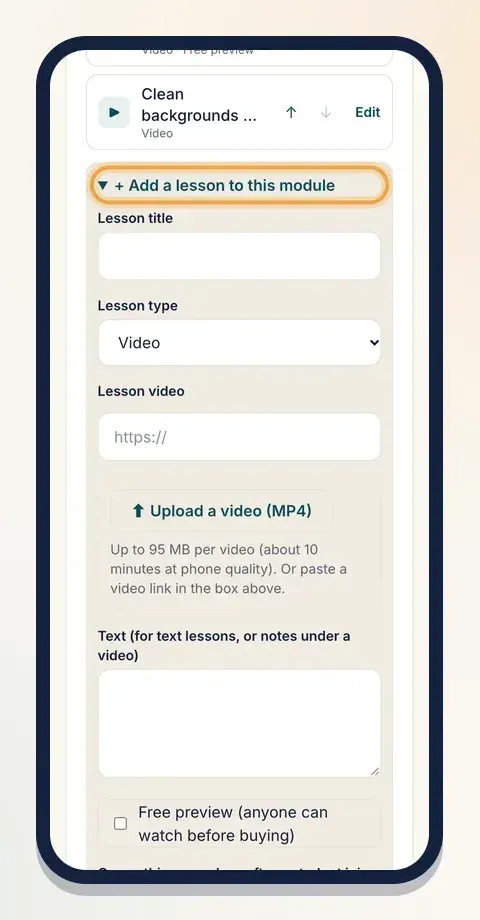
For each lesson you give it a title, pick the type (video, text or quiz), upload your MP4 from your phone or paste a video link, and add notes under the video. Tick Free preview for the lesson you want anyone to watch before buying.
The full walkthrough is in how to create and sell a course on Klaasi. On the Free plan you can have one course; Pro and Business allow more (see pricing).
Step 6: Make the student experience good
People who finish your course tell their friends. Help them finish:
- Show progress so students know how far they've come.
- Make "what's next" obvious at the end of each lesson.
- Give a certificate at the end. It gives people a reason to finish and something to share.
- Add a community if your topic benefits from questions and sharing.
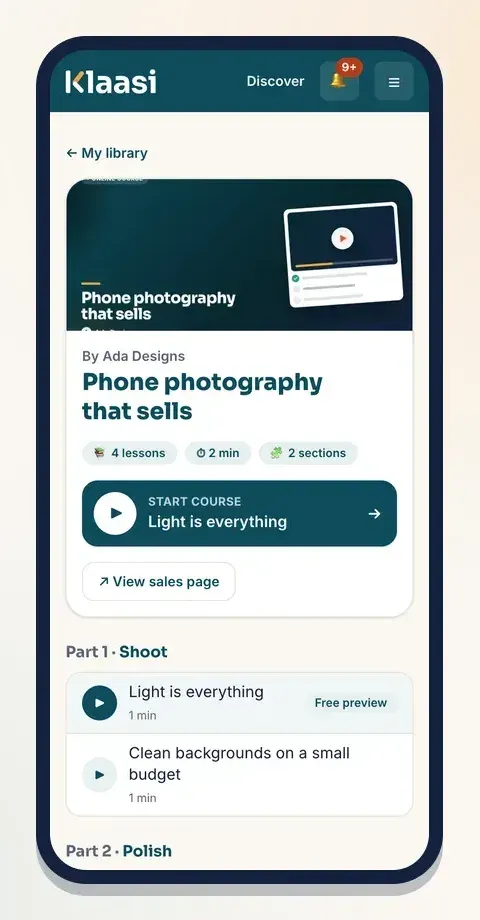
On Klaasi, students see their progress, a Start course or Continue button with the next lesson's name, and a certificate when they finish the last lesson.
Step 7: Price your course
There's no perfect formula, but a few rules help:
- Price the result, not the hours. A short course that helps someone land a client is worth more than a long one that doesn't.
- Look at what similar courses cost in your market, and place yourself honestly.
- Start with a launch price for your first students, then raise it as reviews come in.
- Consider pay in parts for higher prices, so more people can afford to start.
For more on this, read how to price a digital product.
Step 8: Sell your course
A course doesn't sell itself because it exists. Plan your launch:
- Warm up your audience a week before: share tips from the course, behind-the-scenes clips and the problem it solves.
- Open with a free lesson. Let people watch your best short lesson. If they like it, they'll want the rest.
- Post your link everywhere: bio, WhatsApp status, email, groups where it's allowed.
- Collect reviews from your first students and share them.
- Invite affiliates (people who promote your course for a commission) once you have a few sales.
If you sell mainly to people in Nigeria, how to sell online courses in Nigeria has local tips.
Common mistakes
- Making it too long. Cut anything that doesn't help students get the result.
- Waiting for perfect equipment. Light and sound matter more than the camera.
- No free preview. People want to see how you teach before they pay.
- Launching to silence. Build interest before the doors open.
Creating an online course for free is very possible. Plan the result, record short lessons in good light, organise them clearly and give people an easy way to pay. When you're ready, start your free Klaasi shop and add your first lesson.
What to do next
Start selling on Klaasi, free
Your shop, courses, live classes and community in one place. Buyers pay in naira or dollars.
Open my free shopKeep reading
Start an online business from your phone: a beginner's plan
No laptop, no office, no big budget. Here's how to pick an idea, test it, set up a shop, take payments and get your first customers using only your phone.
Selling ebooks online: write, price, design and market your first ebook
From picking a topic people will pay for to pricing, covers, delivery and marketing: a step-by-step guide to selling your own ebook online.
Pricing a digital product or online course, without guessing
Too cheap and people doubt it. Too expensive and nobody buys. A simple, step-by-step way to price ebooks, templates, courses, coaching and live classes.