How to add a payout account on Klaasi (bank, mobile money or USDT)
Tell Klaasi where to send your money: a Nigerian bank with an automatic name check, a dollar account in your country, mobile money, or a USDT wallet. Here's every step and every fee.
Before Klaasi can send you the money from your sales, you need to tell us where to send it. That's your payout account.
You can have one account for naira and one for dollars. Naira goes to a Nigerian bank. Dollars can go to a bank in your country, to mobile money in Ghana, Kenya or Tanzania, or to a USDT wallet.
By the end of this guide you will be able to add each kind of account, understand the name check, and know exactly what each withdrawal costs. Partners (affiliates) use the very same form, so this guide is for them too.
Before you start
- Verify your identity. Klaasi must check who you are before your first withdrawal. It's a legal requirement for payments. On the Wallet page you'll see Identity check with a Verify now button if it isn't done yet.
- Use an account in your own name. The name on the account must match your verified identity.
- Only the shop owner can add or change payout accounts. A Finance team member can see the wallet but can't change where the money goes.
Step 1: Open your Wallet
- Open your dashboard.
- In the menu, under Money, tap Wallet.
- Scroll down to Payout accounts. It says: "Where Klaasi sends your money. You can have one for naira and one for dollars."
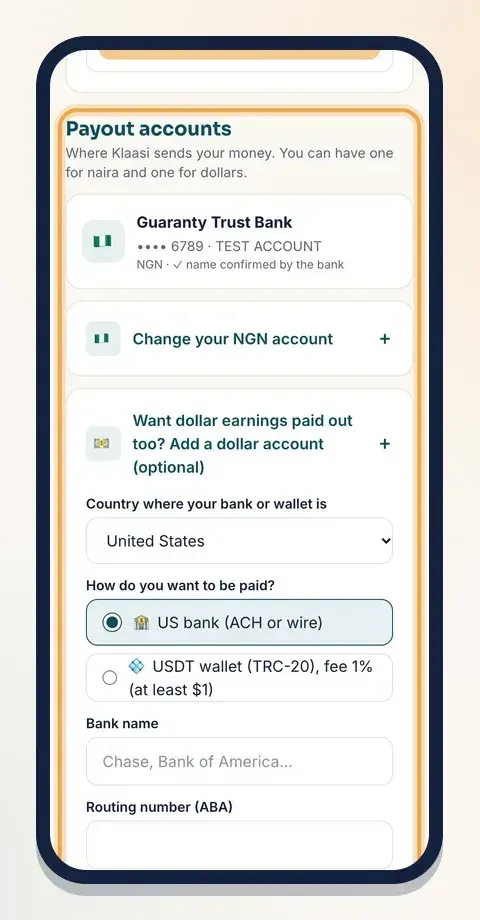
Under it you'll see one box per currency, like Add your Nigerian bank account (naira) and Add your dollar account. Tap a box to open it.
Step 2a: Add a Nigerian bank account (naira)
Naira earnings (from buyers who paid in naira) go to a Nigerian bank account.
- Open Add your Nigerian bank account (naira).
- Under Your bank, type part of your bank's name in Search your bank, for example "gt", "access" or "opay", then pick it from the list.
- Type your Account number (10 digits).
- Klaasi asks the bank for the name on that account. You'll see Checking with your bank… and then the account name with is this you?
- If the name is right, tap Save this account.
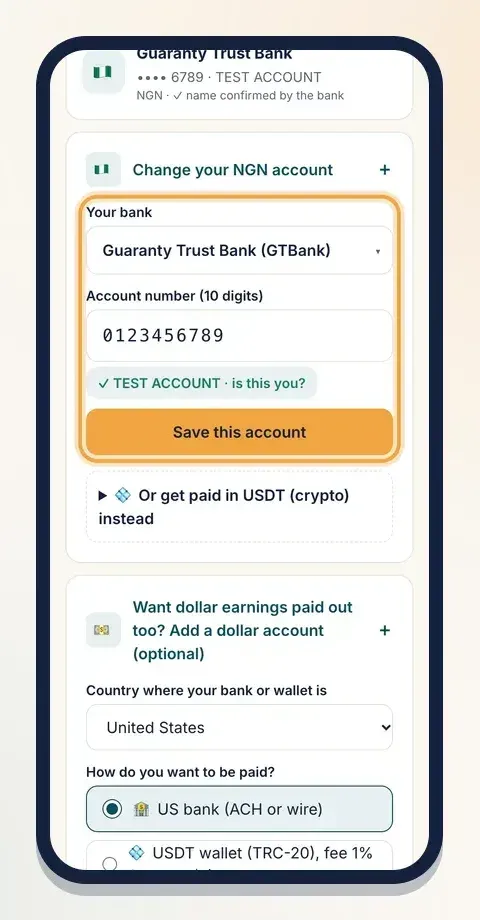
You don't type the account name yourself: it comes straight from the bank. That's the name check. It stops money going to a wrong number by mistake. Saved accounts show name confirmed by the bank.
If the bank can't find the account, you'll see "The bank couldn't find that account." Check the bank and the number and try again.
Step 2b: Add a dollar account
Dollar earnings (from buyers outside Nigeria) can be paid in different ways, depending on your country.
- Open Add your dollar account.
- Under Country where your bank or wallet is, pick your country.
- Under How do you want to be paid?, pick a route. Klaasi only shows the routes that work in your country.
- Fill in the fields for that route, then type the Name on the account exactly as your bank or wallet shows it.
- Tap Save this account.
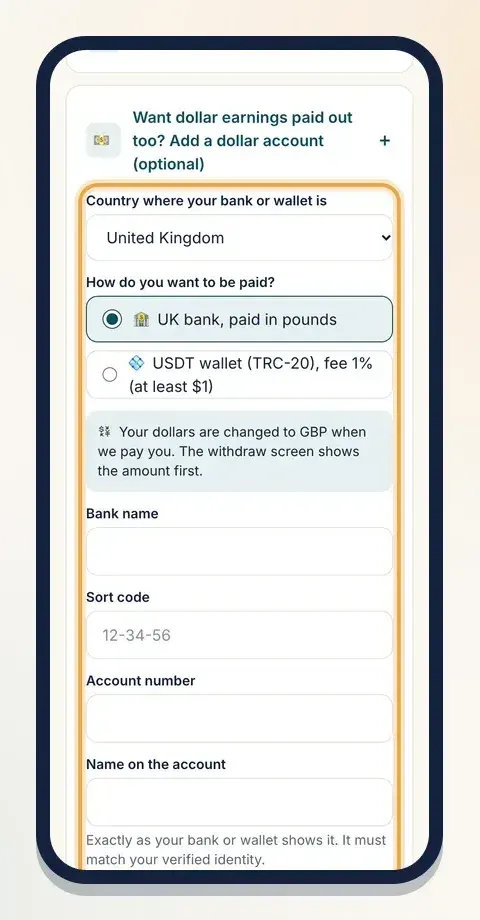
Here are the routes by country:
- United States: US bank (ACH or wire). You need the bank name, routing number (9 digits), account number, account type and your bank's branch address.
- United Kingdom: UK bank, paid in pounds. Sort code and account number.
- France, Germany, Spain, Italy, Netherlands: bank in euros (SEPA / IBAN). Your IBAN, and the BIC if you have it.
- Canada: Canadian bank (institution, transit and account number) or Interac e-Transfer (just your email).
- Ghana, Kenya, Tanzania, Uganda: a bank account paid in local money. Pick your bank from the list and type your account number.
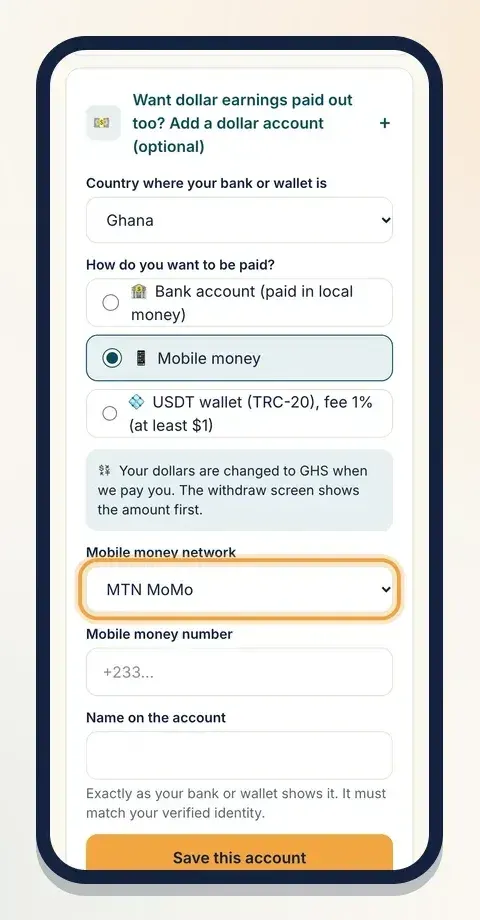
- Ghana, Kenya, Tanzania: Mobile money. Pick your network (for example MTN MoMo, Telecel Cash, M-Pesa, Airtel Money or Tigo Pesa) and type your number with the country code.
- Other countries: Bank transfer by SWIFT (paid by Klaasi). You give your bank's SWIFT / BIC code, your IBAN or account number, the bank's address and your address.
- Every country: a USDT wallet (TRC-20), covered below.
When you're paid in local money (pounds, euros, cedis, shillings and so on), your dollars are changed when we pay you. The withdraw screen shows the amount first, so there are no surprises.
About SWIFT: our payment partner can't send money to some countries yet. For those, Klaasi pays you by international bank transfer by hand. It can take 3 to 5 working days, and your bank may charge a receiving fee.
Step 2c: Get paid in USDT instead (crypto)
Anyone can choose USDT on the Tron network (TRC-20), for naira or dollar earnings.
- For dollars: open Add your dollar account, then pick USDT wallet (TRC-20) under How do you want to be paid?. $1 = 1 USDT.
- For naira: open the naira box and tap Or get paid in USDT (crypto) instead. Klaasi changes your naira to USDT at the day's rate.
Paste your wallet address from your wallet app. It starts with T and has 34 characters. Klaasi checks the format before saving.
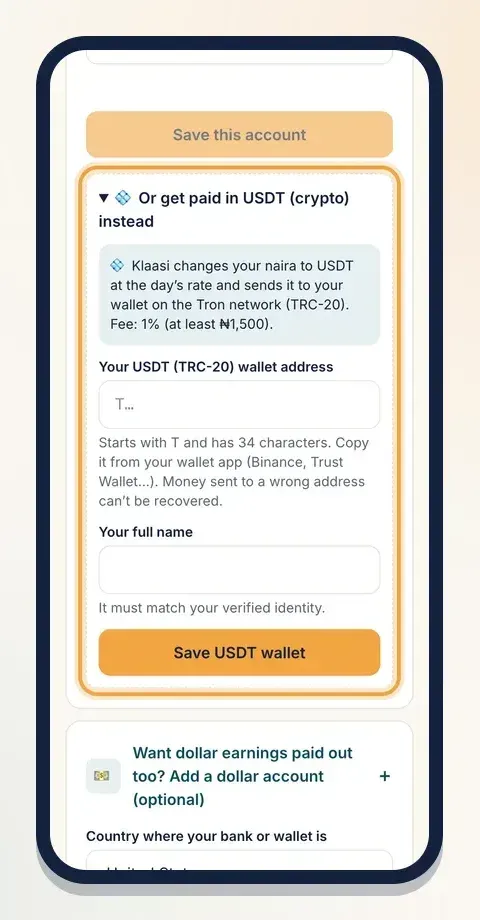
Money sent to a wrong crypto address can't be recovered. Copy and paste the address; never type it by hand. Make sure your wallet supports USDT on TRC-20.
Step 3: Check your saved accounts
After saving, you'll see Payout details saved. Your accounts appear as cards at the top of Payout accounts, with the bank or network, the last 4 digits only (like •••• 1234), the name, the currency, and name confirmed by the bank for Nigerian banks.
Your full details are stored encrypted. Screens only ever show the last 4 digits.
To change an account, open Change your NGN account or Change your USD account and save the new one. The new account replaces the old one for that currency.
Withdrawal fees and minimums
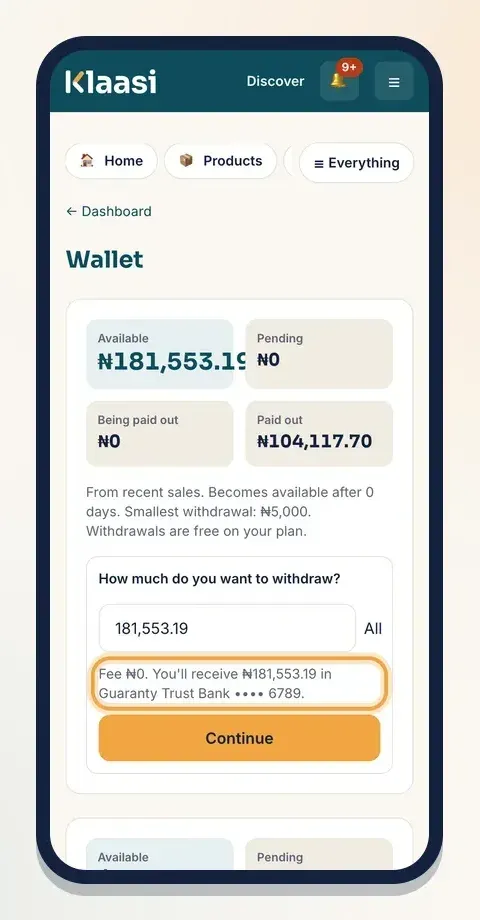
These are Klaasi's current withdrawal fees. You see the exact fee on the withdraw screen before you confirm.
- Naira to a Nigerian bank: ₦100 on Free. Free on Pro and Business.
- Dollars to a bank or mobile money: 1% of the amount, at least $1 and at most $15.
- USDT (TRC-20): 1%, at least $1 for dollars or ₦1,500 for naira.
There is also a smallest withdrawal for each currency. Your Wallet shows it under your balance, next to the fee for your plan.
When you tap Withdraw, Klaasi shows a summary like "Fee ₦100. You'll receive ₦24,900 in your bank." and then asks you to confirm.
Want it hands-free? Under Automatic withdrawals, choose Every day, Every week or Every month. Klaasi creates the withdrawal for you, and still checks each one before the money is sent.
For partners (affiliates)
Partners add their payout account the same way, on their partner dashboard at the bottom under Where we pay you. Partner withdrawals to a Nigerian bank are free; dollar and USDT routes have the same fees as above. Partners with a verified identity and a payout account are paid once a week.
Common problems
- "Check the account number." The number has the wrong length or has letters. Copy it from your banking app.
- "That routing number isn't right." US routing numbers have 9 digits. Check your banking app or cheque.
- "That IBAN isn't right, or it's from another country." The IBAN must start with your country's two letters.
- "That isn't a USDT TRC-20 address." It must start with T and have 34 characters. Some wallets show other networks first; switch to TRC-20.
- Naira earnings but you live abroad? The wallet says so and asks for a Nigerian bank account. No Nigerian account? Contact Support and we'll help.
What to do next
Start selling on Klaasi, free
Your shop, courses, live classes and community in one place. Buyers pay in naira or dollars.
Open my free shopKeep reading
How to use the Klaasi developer API, webhooks and AI tools (MCP)
Connect your shop to your own website, Zapier, Make or an AI assistant. Create an API key, pick its permissions, receive signed webhooks for every sale and check them safely.
How to handle refunds and support as a seller on Klaasi
Klaasi has one refund policy for every shop. Buyers message Support, you reply with your side, and Klaasi decides using real evidence. Here's how it works and how to answer a refund request.
How to add team members to your Klaasi shop (and what each role can do)
Invite a helper by email and give them the right role: Editor, Support or Finance. Each role sees only what it needs, and only you can move money. Here's how.