How to handle refunds and support as a seller on Klaasi
Klaasi has one refund policy for every shop. Buyers message Support, you reply with your side, and Klaasi decides using real evidence. Here's how it works and how to answer a refund request.
Most buyers are happy. But sooner or later someone will say "I can't open it" or "I paid twice". How you handle that moment protects your money and your name.
On Klaasi you don't have to write your own refund policy or argue with buyers in your DMs. There's one clear policy for every shop, buyers go through Support, you give your side, and Klaasi decides using what actually happened.
By the end of this guide you'll know the policy, how a buyer asks for help, where refund requests show up, how to reply, who pays, and how to keep refunds rare.
Klaasi's one refund policy
Every shop on Klaasi uses the same refund policy. You don't set your own, and you don't need to add refund badges or promises to your pages. Buyers can read it at klaasi.com/legal/refunds.
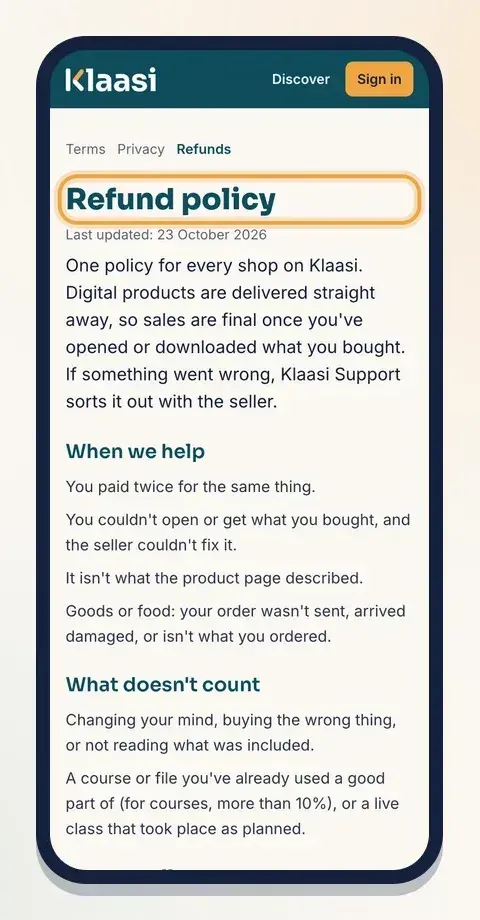
In short:
- Digital products are delivered straight away, so sales are final once the buyer has opened or downloaded what they bought.
- Klaasi helps when the buyer paid twice, couldn't open or get what they bought and the seller couldn't fix it, or it isn't what the product page described.
- For goods or food: the order wasn't sent, arrived damaged, or isn't what was ordered.
- The buyer must tell Support within 7 days of buying.
Just as clear is what doesn't count:
- Changing their mind, buying the wrong thing, or not reading what was included.
- A course or file they've already used a good part of. For courses, that means more than 10% of the course.
- A live class that took place as planned.
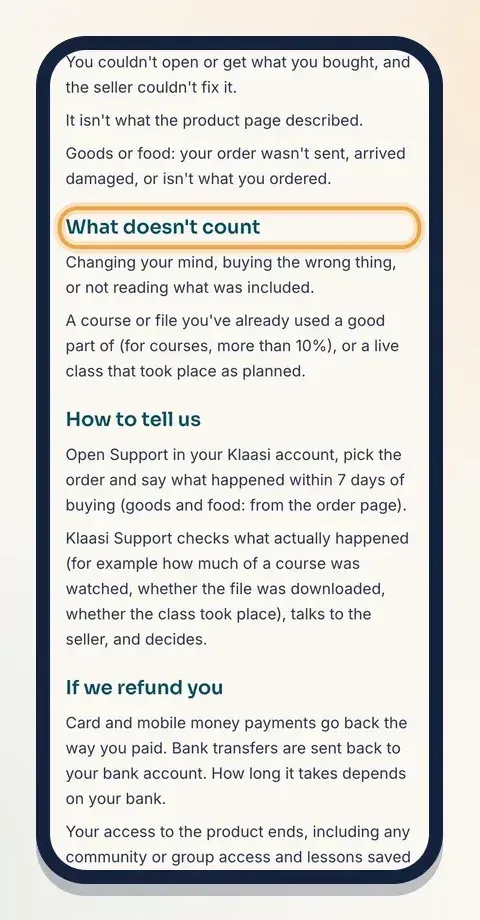
This is good for you. A buyer can't take your whole course and then ask for their money back.
How a buyer asks for help
Your product pages don't show refund buttons. The buy box simply says A problem with your order? Message Support. Buyers of shop goods see Report a problem with this order on their order page.
When a buyer opens Support while signed in, they see A problem with something you bought? with a list of their recent orders. They pick the order, explain what happened, and can attach photos or a PDF as evidence.
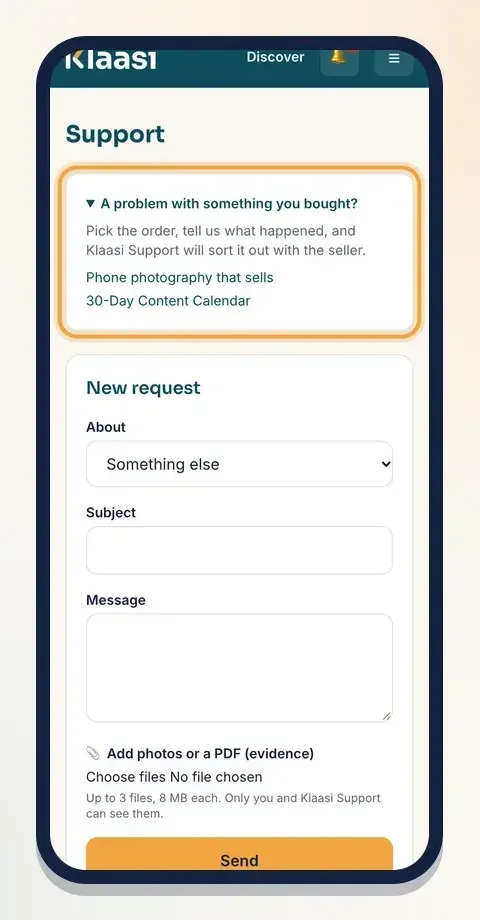
Klaasi Support reads it first. Many problems aren't refunds at all: the buyer was signed in with another email, or didn't find the Download button in their library. Support helps them and the matter ends there.
If it really is a refund case, Support opens a refund request, and it comes to you.
Step 1: Find your refund requests
Open your dashboard. In the menu under Money, tap Refunds. (Shops selling goods or food find it under More tools.) A small number beside it tells you how many requests are waiting.
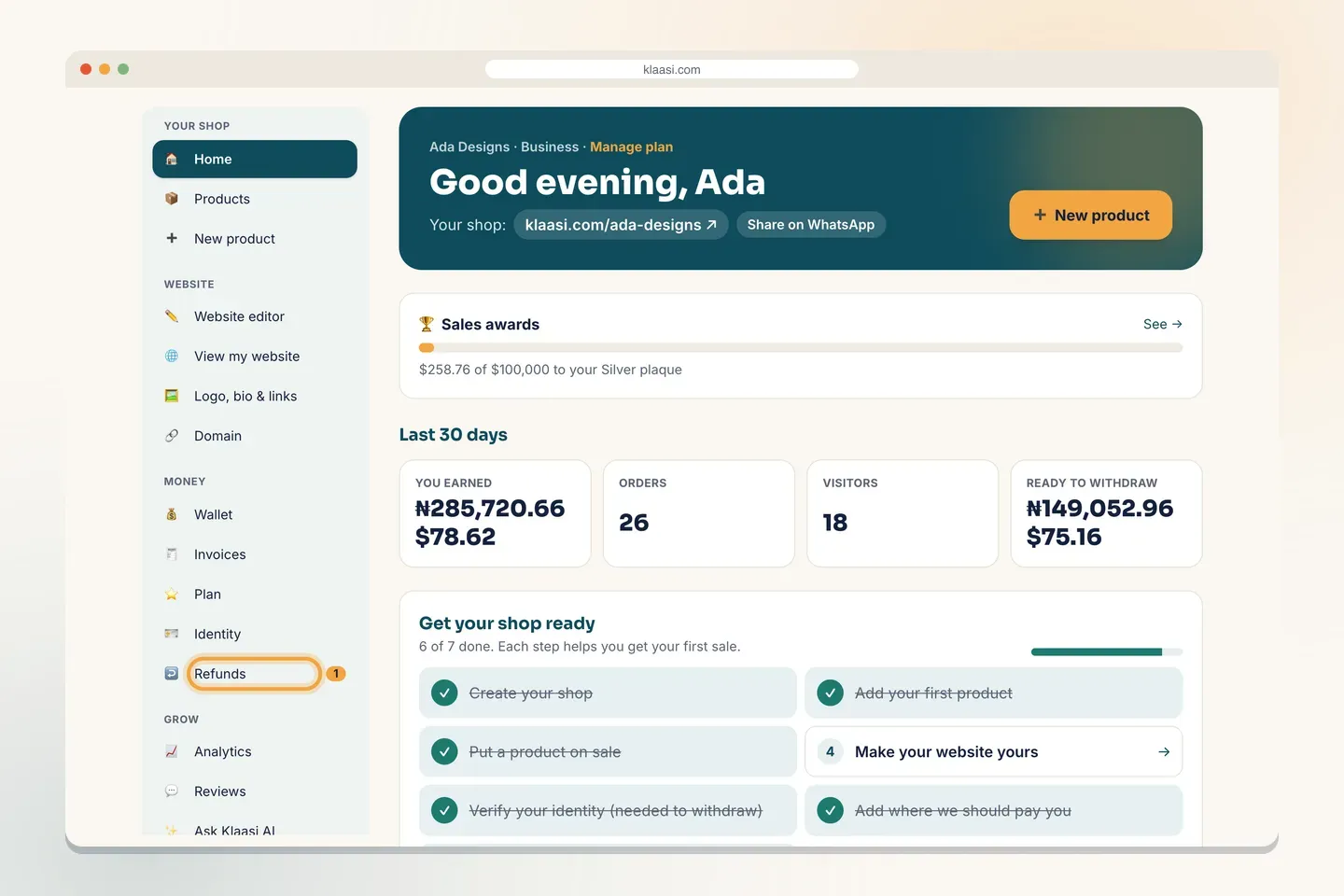
Team members can see this page only if their role allows it.
The page is called Refund requests. At the top you'll see a reminder: if a refund is approved, the amount comes from your earnings, including the payment provider's cost.
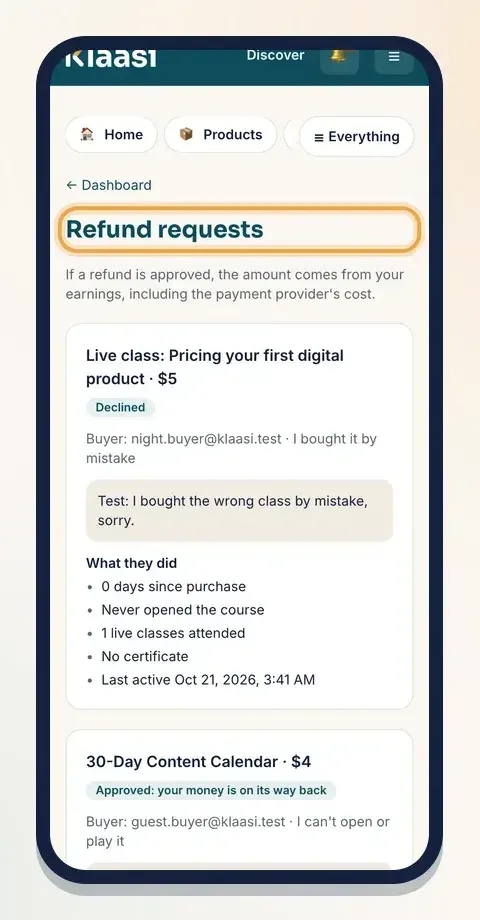
Each request shows its status:
- Waiting for review: it needs your reply.
- The creator has replied; Klaasi is reviewing: you've answered.
- Approved: your money is on its way back or Declined: Klaasi has decided.
No requests? You'll see "No refund requests. Good sign!"
Step 2: Read the request and the evidence
Each request card shows:
- The product and the amount.
- The buyer and the reason they picked, such as "I can't open or play it", "It isn't what was described", "I paid twice" or "I bought it by mistake".
- The buyer's own words.
- What they did: facts Klaasi collected from your product, not from the buyer.
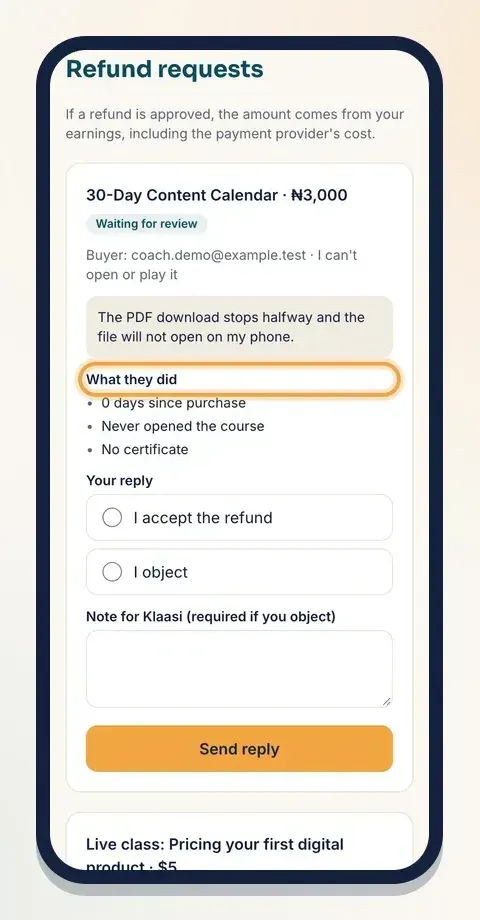
What they did is the most useful part. It can show how many days since purchase, how many lessons they opened and completed, minutes watched, how many times they downloaded a file, how many live classes they attended, whether they got a certificate, and when they were last active. This is the evidence Klaasi uses to decide, so you don't have to argue about it.
Step 3: Send your reply
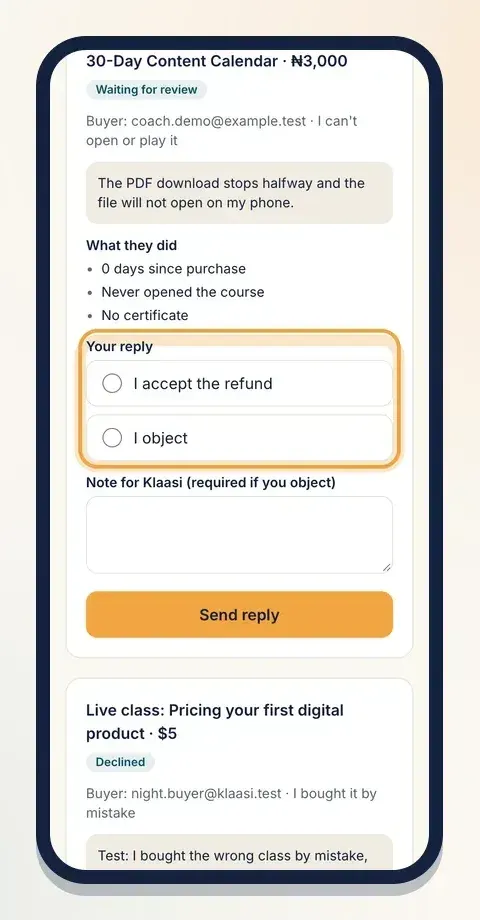
Under Your reply, choose one:
- I accept the refund: you agree the buyer should get their money back.
- I object: you think the request doesn't fit the policy.
If you object, write a short, calm note in Note for Klaasi (required if you object). It needs at least 10 characters. Stick to facts: "The buyer finished 6 of 8 lessons and downloaded the workbook", or "I sent a working link on Tuesday and the buyer confirmed it opened."
Then tap Send reply. You'll see "Reply sent. Klaasi will decide."
Tips for a good reply:
- Fix it first if you can. If the buyer couldn't open a file, upload a working one and tell Support. A solved problem is better than a refund.
- Be honest. If the page really over-promised, accept it and improve the page.
- Keep it short and factual. Klaasi reads the evidence; your note explains anything the evidence can't show.
Step 4: Klaasi decides
Klaasi Support looks at the request, the evidence and your reply, then approves or declines. Both you and the buyer are told.
If the refund is approved:
- Card and mobile money payments go back to the buyer the way they paid. Bank transfer payments are sent back to the buyer's bank account.
- The buyer loses access to the product, including any community or group access and lessons saved for offline use.
- If the buyer paid in parts, the refund covers the latest part they paid, and any parts not yet paid are cancelled.
Who pays for a refund
You do. When a refund is approved, the amount comes from your earnings, including the payment provider's cost. Klaasi does not pay refunds.
Your earnings are held for a few days before you can withdraw them (at the time of writing, 3 days for naira and 5 days for dollars), so there's usually money in your wallet to cover a refund. If a refund comes after you've already withdrawn, your wallet can go below zero. You'll see "You owe …" and it comes out of your next sales.
You can see every refund on your wallet statement under the Refunds tab. See how to get paid and withdraw on Klaasi.
Chargebacks
Klaasi asks buyers to message Support before opening a dispute with their bank. Buyers who open disputes without asking first may have their account restricted. If a dispute does happen, keep your product page accurate and your delivery working: that's your best evidence.
How to keep refunds rare
Most refund requests come from confusion, not bad faith. These habits cut them down:
- Describe exactly what's inside. List the lessons, pages or files. Say how long it takes. Don't promise results you can't control.
- Show it. Add a sample, a table of contents or an intro video so buyers know what they're getting. See how to add an intro video to your product.
- Test your delivery. Open your own product as a buyer would. Check that files download and videos play on a phone.
- Welcome buyers. A short welcome email tells them where to find their purchase. See how to send email sequences and abandoned-cart emails.
- Reply quickly. When Support contacts you, answer the same day if you can.
Quick answers
- Can I set my own refund rules? No. Every shop uses Klaasi's one policy, so buyers know what to expect everywhere.
- Can a buyer get a refund after finishing my course? Not under the policy: more than 10% of a course used doesn't count.
- Do I have to accept every request? No. Choose I object and explain. Klaasi decides on the evidence.
- Who talks to the buyer? Klaasi Support. You give your side on the Refund requests page.
What to do next
- How to get paid and withdraw on Klaasi
- How to collect and show reviews on Klaasi
- How to add team members to your shop, so a trusted helper can watch your requests.
Start selling on Klaasi, free
Your shop, courses, live classes and community in one place. Buyers pay in naira or dollars.
Open my free shopKeep reading
How to use the Klaasi developer API, webhooks and AI tools (MCP)
Connect your shop to your own website, Zapier, Make or an AI assistant. Create an API key, pick its permissions, receive signed webhooks for every sale and check them safely.
How to add team members to your Klaasi shop (and what each role can do)
Invite a helper by email and give them the right role: Editor, Support or Finance. Each role sees only what it needs, and only you can move money. Here's how.
How to track sales on Klaasi with analytics, ad pixels and A/B tests
See what you earned, how many people visited, where they came from and which product sells best. Then measure your ads with pixels and test a second headline.