How to choose and upgrade your Klaasi plan (Free, Pro or Business)
Free, Pro and Business explained in plain words: what each plan gives you, what it costs, and how to upgrade from your wallet or by card, bank transfer or mobile money.
Every shop on Klaasi starts on the Free plan. You can sell from day one and pay nothing until you make a sale. When your shop grows, Pro or Business lowers your fees and unlocks more tools.
By the end of this guide you will know what each plan gives you, how to see your current plan, and how to upgrade, renew or stop renewing in a few taps.
The three plans in one minute
Klaasi has three plans. Here they are in plain words.
Free is for your first sales. You get:
- 3 products and 1 course
- 2 GB of storage for videos and files
- 1 live class a month, up to 1 hour
- 1 community with up to 30 members
- Coupons, order bumps, bundles and pay what you want
- Your own partners with tracked links (private invite links)
- Up to 3 invoices a month
- 1 team seat (just you)
Pro is for creators selling every week. Everything in Free, plus:
- Unlimited products and up to 20 courses
- 50 GB of storage
- 20 live class hours a month, up to 100 people per class
- 3 communities with unlimited members
- All 6 product page designs and your own brand colour
- Marketing banners for every product
- Your products can be listed in the Klaasi affiliate shop
- Pay in parts for your buyers
- Email sequences and abandoned-cart emails
- 2 team seats (you plus one helper)
- Up to 200 invoices a month
- Free naira withdrawals
Business is for schools, academies and big communities. Everything in Pro, plus:
- Unlimited courses and communities
- 200 GB of storage
- 60 live class hours a month, up to 500 people per class
- 5 team seats with roles
- Full analytics, A/B tests for headlines, and your own CSS
- The developer API and webhooks, and AI tools that connect to your shop
- Your own domain (yourname.com)
- No monthly limit on invoices
- Priority support
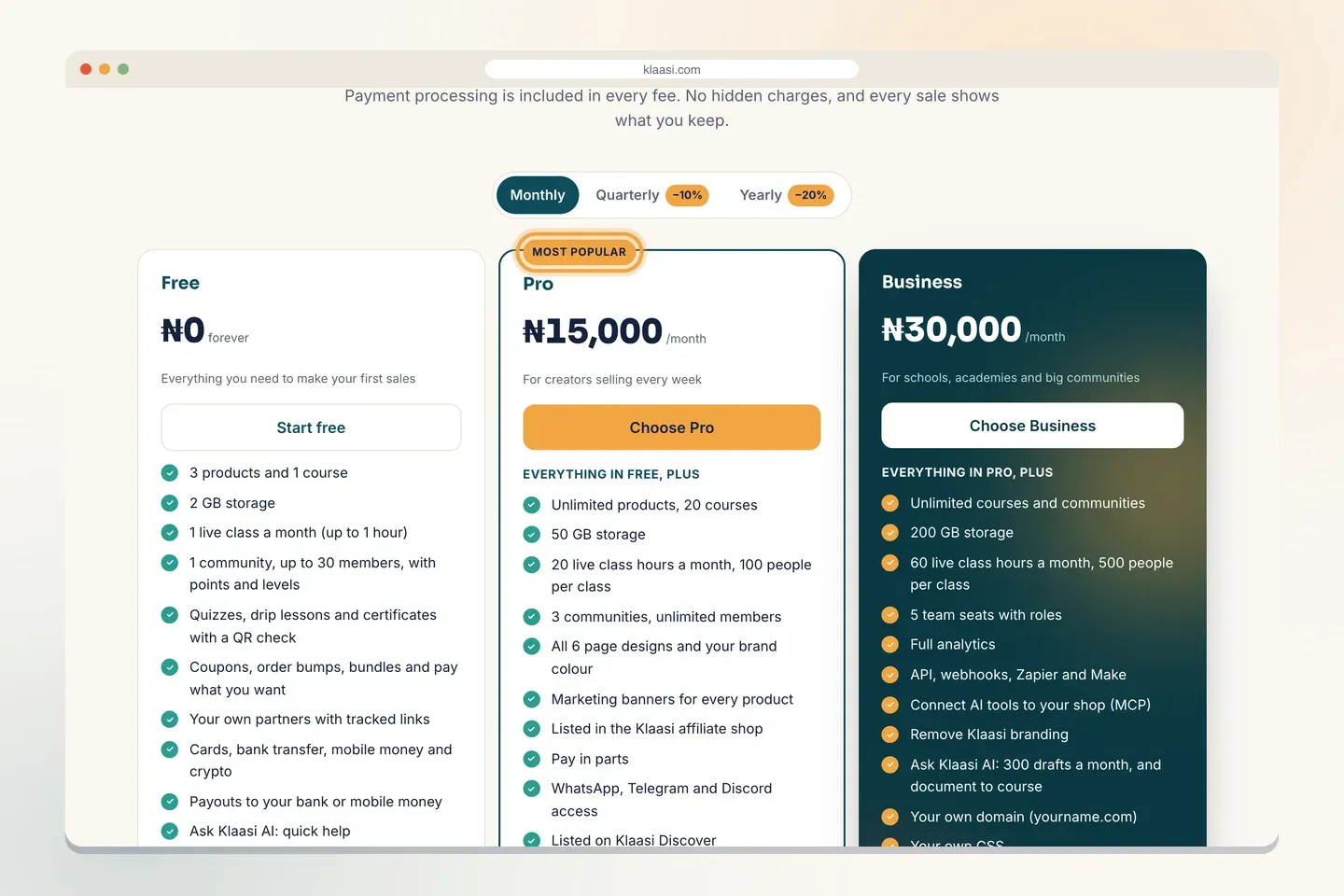
You can always see the full, current list on the pricing page (klaasi.com/pricing). Fees, prices and limits are set by Klaasi and can change, so the pricing page is the place to check before you decide.
What each plan costs
Prices follow where you are. Sellers in Nigeria see naira and everyone else sees dollars:
- Free: ₦0 / $0, forever.
- Pro: ₦11,500 or $8 a month.
- Business: ₦30,000 or $49 a month.
The screenshots in this guide come from a demo shop, so the amounts in them may differ from today's prices. The pricing page (klaasi.com/pricing) always shows the current ones.
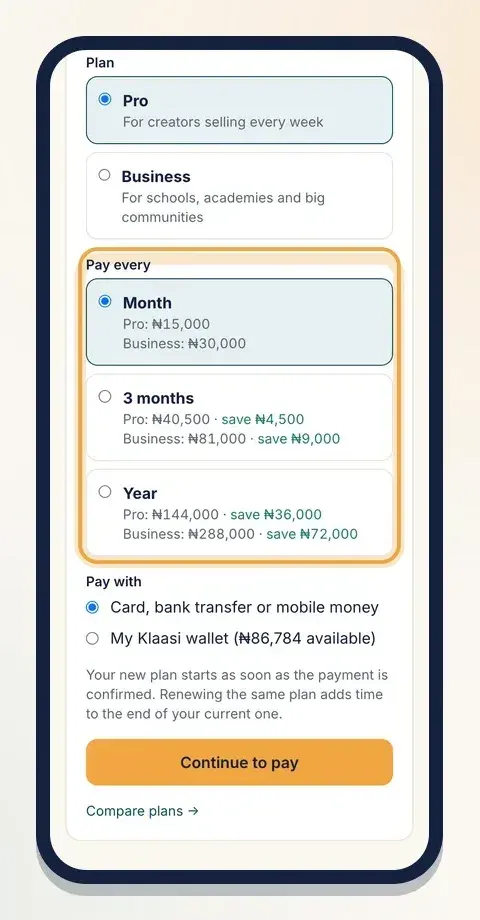
You can also pay for 3 months or a Year at a time. Paying for 3 months saves 10%, and paying for a year saves 20%. The plan page shows the exact saving next to each choice, like "save ₦…".
Fees on each sale
On top of the plan price, Klaasi takes a small fee only when you sell. No sale, no fee. Payment processing is already inside these rates, so there's nothing extra to pay the payment company.
- Payments in naira (card, bank transfer or USSD from buyers in Nigeria): Free 4%, Pro 3%, Business 2.5%.
- Mobile money: Free 5%, Pro 4.5%, Business 4%.
- International cards: 7% + $0.40 on every plan.
- Crypto (international buyers): 4% on every plan.
The fee comes out of each sale, so you never get a bill for it. On each product you can choose who pays the fee: you, your buyer, or half each.
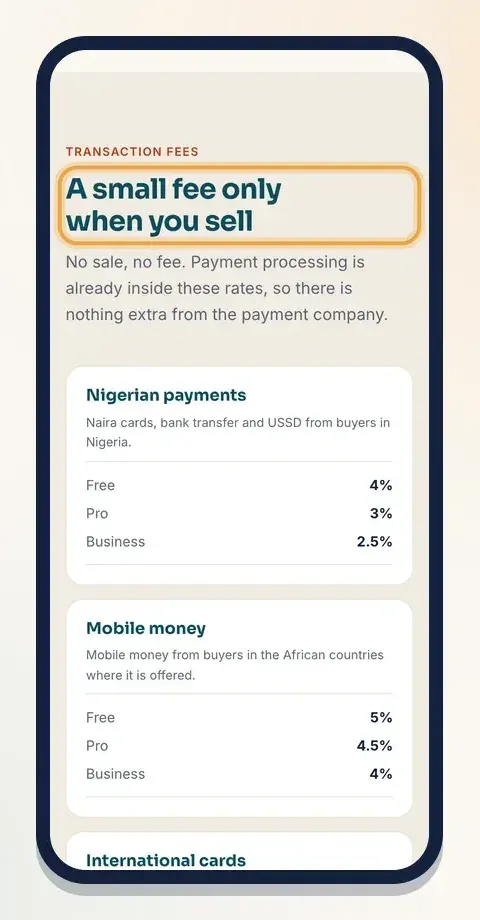
A quick way to decide: if you sell a lot in naira, compare what you pay in fees each month on Free with the Pro price. When the fee you save is more than the plan costs, Pro pays for itself. And if you need a tool that only a higher plan has (like banners, pay in parts or your own domain), that decides it too.
Step 1: Open your plan page
- Sign in and open your dashboard.
- In the menu, under Money, tap Plan.
At the top you see your Current plan. On Free, it says You are on Free. Upgrade to lower your fees and unlock more tools.
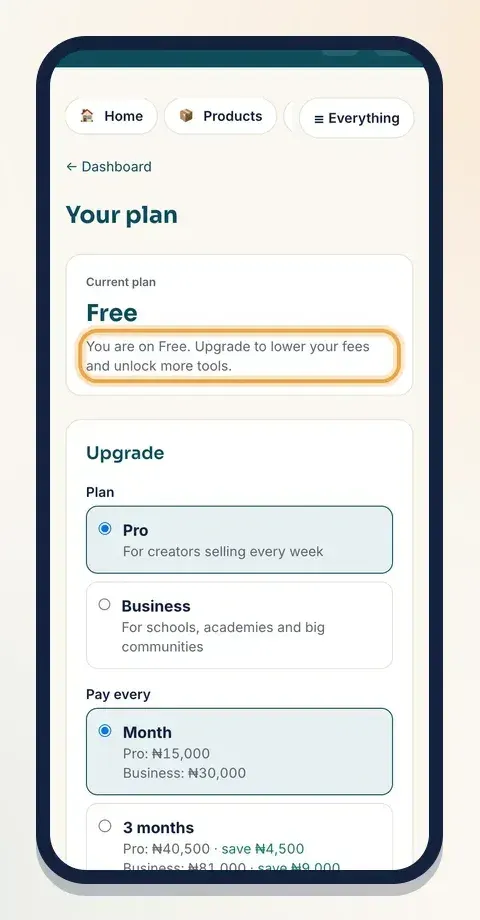
Only the owner of a shop can choose or pay for its plan. If you are a team member, ask the owner.
Step 2: Pick a plan and how often to pay
Under Upgrade:
- Under Plan, tap Pro or Business.
- Under Pay every, choose Month, 3 months or Year. Each choice shows the price and how much you save.
Step 3: Choose how to pay
Under Pay with you have two choices:
- Card, bank transfer or mobile money. You go to secure checkout and pay like any buyer would.
- My Klaasi wallet. This takes the money from what you've already earned on Klaasi. It shows how much you have available. If the wallet doesn't have enough, choose the first option.
Tap Continue to pay.
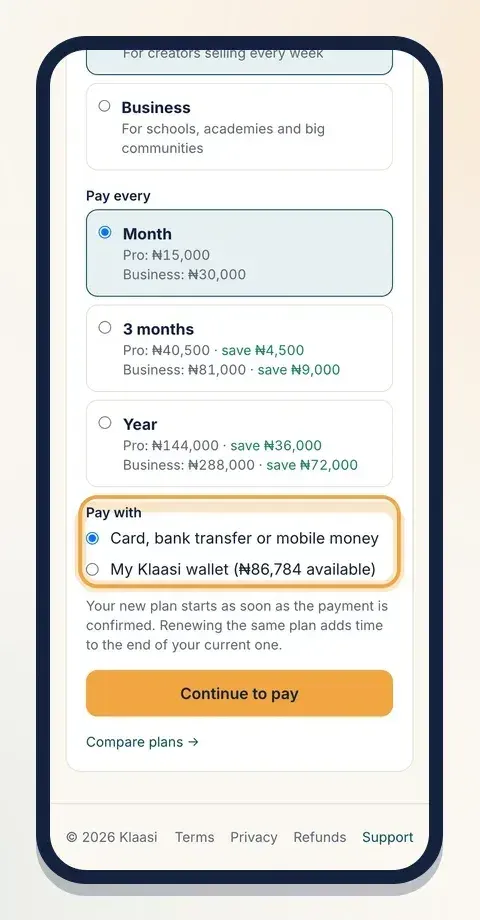
Your new plan starts as soon as the payment is confirmed. If you paid by checkout, the plan page says Confirming your payment… this page refreshes by itself. When it's done you see Done. Your plan is active.
Renewing the same plan adds time to the end of your current one, so you never lose days you already paid for.
Step 4: Renewing, stopping and the 3 grace days
Once you're on Pro or Business, the plan page shows when it renews and how much it costs, for example "Renews on Nov 20, 2026: $49, Month."
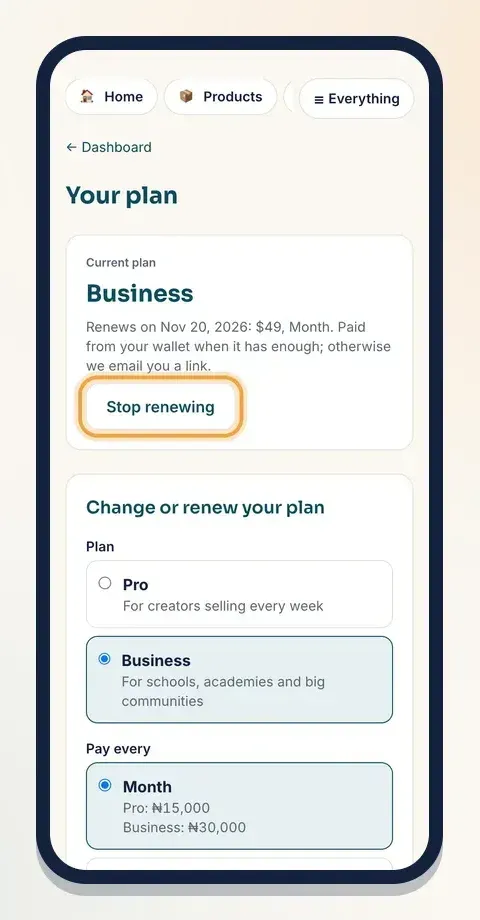
Here's how renewals work:
- On the renewal day, Klaasi pays the plan from your wallet if it has enough.
- If the wallet doesn't have enough, we email you a link to pay by card, bank transfer or mobile money.
- You have 3 days after the renewal date to pay. The plan page shows "Renewal of … is due since …".
- After the 3 grace days, the shop goes back to Free. Your products stay; only the paid tools switch off.
Don't want to renew? Tap Stop renewing. Your plan stays until the end of the period you paid for, then you go back to Free. Changed your mind? Tap Keep renewing.
Every plan payment is listed under Plan payments at the bottom of the page, with its status: Waiting, Paid, Failed or Cancelled.
What happens to your shop on Free again?
Nothing is deleted. Your products, students and sales history stay. What changes:
- Paid-only tools stop (for example banners, pay in parts and email sequences).
- Product pages go back to the Classic design.
- Your own domain points back to your klaasi.com address until you upgrade again.
- Your fees go back to the Free rates on new sales.
When you upgrade again, everything comes back.
Where plans show up in your dashboard
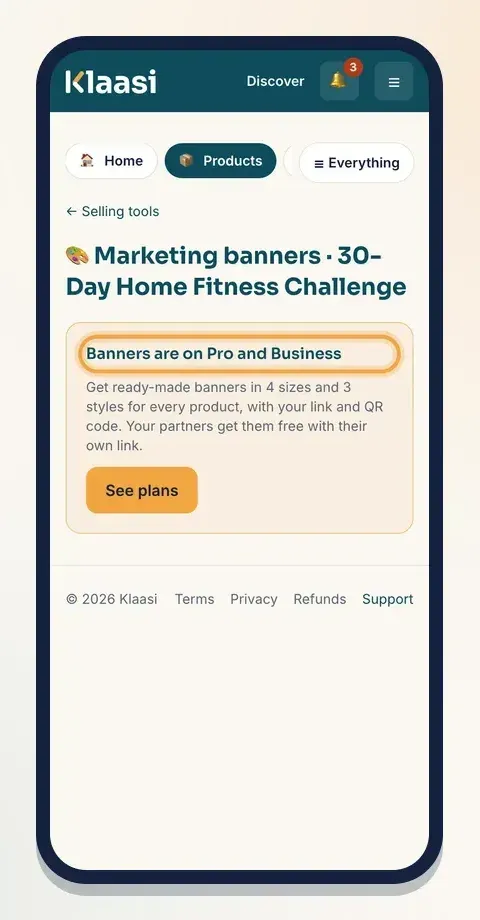
Klaasi tells you when a tool needs a higher plan, right where you'd use it. For example, on Free the Marketing banners page says Banners are on Pro and Business with a See plans button.
The Invoices page shows how many invoices you have left this month, and the Team page shows how many seats your plan has. So you only upgrade when you really need to.
Which plan should you pick?
- Just starting, or testing an idea? Stay on Free. It has everything you need for your first sales.
- Selling every week, running ads, or using partners? Pro lowers your naira fees, adds banners, pay in parts, email sequences, a helper seat and free naira withdrawals.
- Running a school, academy or a big community, or need your own domain? Pick Business.
You can change plan in one tap, so start small and move up when it pays for itself.
What to do next
- Get paid and withdraw your money
- Add team members to your shop
- Make marketing banners for your product
Ready to compare? Open the pricing page at klaasi.com/pricing.
Start selling on Klaasi, free
Your shop, courses, live classes and community in one place. Buyers pay in naira or dollars.
Open my free shopKeep reading
How to use the Klaasi developer API, webhooks and AI tools (MCP)
Connect your shop to your own website, Zapier, Make or an AI assistant. Create an API key, pick its permissions, receive signed webhooks for every sale and check them safely.
How to handle refunds and support as a seller on Klaasi
Klaasi has one refund policy for every shop. Buyers message Support, you reply with your side, and Klaasi decides using real evidence. Here's how it works and how to answer a refund request.
How to add team members to your Klaasi shop (and what each role can do)
Invite a helper by email and give them the right role: Editor, Support or Finance. Each role sees only what it needs, and only you can move money. Here's how.