Selling food online: menus, WhatsApp orders, delivery and pricing
A practical guide for home cooks, restaurants and caterers: build a menu people can order from, choose between WhatsApp orders and a menu link, plan delivery and price your food for profit.
People order food from their phones every day, and they don't only order from big restaurants. Home cooks, small kitchens, bakers, caterers and drink makers all sell food online. If you can cook well and deliver on time, you can build a real business.
This guide shows you how to sell food online and take orders without chaos: how to build a menu people can order from, whether to take orders on WhatsApp or through a menu link, how to plan delivery, and how to price food so you actually make money.
Before you sell food online: the basics
Selling food comes with responsibility. Before you take your first order:
- Know the rules where you live. Many places have food hygiene rules or permits for selling food. Check with your local authority.
- Keep your kitchen clean and your ingredients fresh. One bad experience can end a food business.
- Label allergens like nuts, dairy, gluten and shellfish clearly.
- Plan packaging that keeps food hot (or cold) and doesn't leak.
Step 1: Build a menu that makes ordering easy
Your menu is your shop. A good online menu answers every question before the customer asks.
Keep it short
A short menu is easier to cook, easier to buy ingredients for and easier for customers to choose from. Start with your best 5 to 10 items. You can add more when you know what sells.
Group it into sections
Rice dishes, soups and swallow, small chops, drinks, desserts. Sections help hungry people find what they want quickly.
Describe each dish properly
For every dish, say:
- What's in it, in plain words.
- The portion size: one plate, a litre, serves two.
- How spicy it is.
- What's included and what costs extra.
Use good photos
Food is bought with the eyes. Take photos in daylight, near a window, on a clean plate. Shoot from above for rice and soups, and from the side for burgers and cakes. If you don't have photos yet, a clean drawn picture is better than a blurry one.
Offer choices (add-ons)
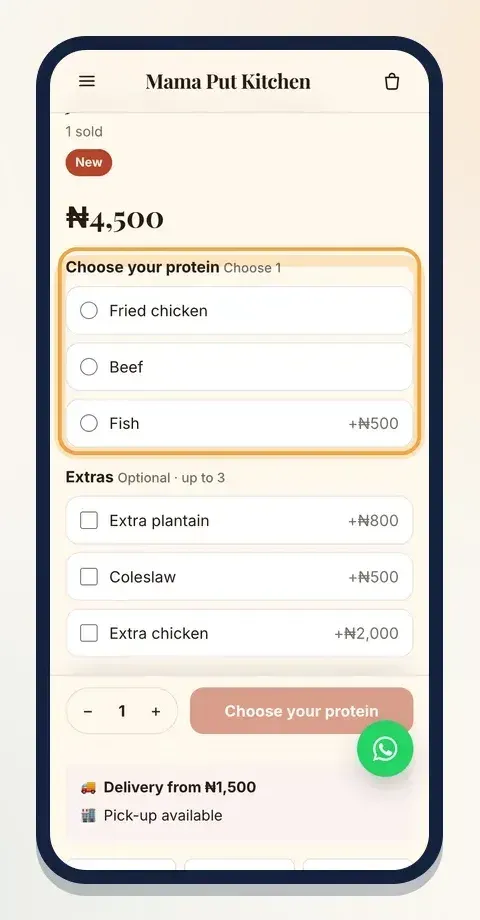
Let customers choose their protein, drink or extras. It saves messages ("can I have beef instead?") and increases the order value, because many people add an extra when it's one tap away.
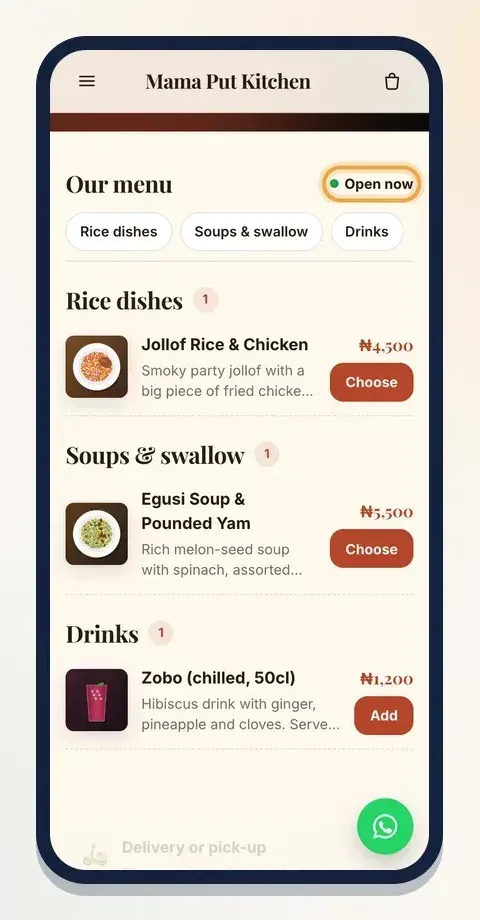
Here's what a simple online menu looks like on a phone, with sections, pictures and prices:
And here's what the customer sees when they choose a dish, with a required protein and optional extras:
Step 2: WhatsApp orders or a menu link?
Many food sellers start on WhatsApp, and that's fine. But as orders grow, WhatsApp-only ordering starts to hurt.
Taking orders on WhatsApp
Good: customers already use it, it feels personal, and you can answer questions.
Hard: every order is a conversation. You type the menu again and again, work out totals by hand, chase payments, and orders get lost in long chats. When you're cooking, you can't reply, and hungry people don't wait.
Taking orders through a menu link
Good: customers see the full menu with prices, pick what they want, choose delivery or pick-up and pay. The order arrives complete and paid. You can cook instead of typing.
Hard: some customers still like to chat first. That's why a WhatsApp button on your menu is useful.
The best of both
Share your menu link on WhatsApp status, in groups and in your bio, and keep WhatsApp for questions. When someone asks "what do you have today?", reply with your menu link instead of typing the list.
On Klaasi, you can build a menu with sections, photos and add-ons. Customers order and pay online, and when you add your WhatsApp number, a WhatsApp button stays on your menu for questions. On Pro and Business, verified sellers can also choose to take orders on WhatsApp or show a menu only, if that suits them better. The step-by-step setup is in how to sell food online with a Klaasi menu.
Step 3: Plan delivery and pick-up
Delivery is where food businesses win or lose customers. Decide these before you launch:
Where you deliver
Draw your delivery area honestly. Delivering across a whole city sounds good until food arrives cold two hours later. Start with nearby areas and grow.
What delivery costs
Group areas by distance and give each group one fee, so customers know the cost before they order. Some sellers offer free delivery above a certain order value; it encourages bigger orders. Make sure your fee covers the rider, fuel and packaging.
How long it takes
Tell customers the real time: "40 to 60 minutes", not "soon". If you're busy, say so.
Who delivers
You, a family member, a dispatch rider you trust or a delivery company. Whoever it is, agree on how they'll handle problems: a wrong address, a customer who doesn't answer, spilled food.
Pick-up
Pick-up saves your customer the delivery fee and saves you a rider. Give a clear address and pick-up times.
Opening hours and pausing orders
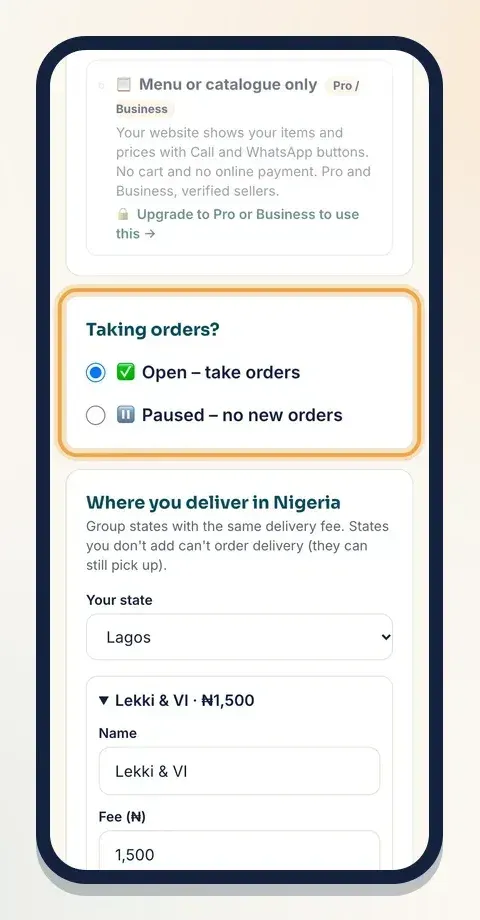
Only take orders when you can cook them. Set your opening hours and stick to them. If you sell out, travel or run out of gas, pause orders. It's better than accepting an order you can't deliver.
On Klaasi, you set delivery areas with their fees, a pick-up address, opening hours, and you can switch between Open and Paused with one tap:
Step 4: Price your food for profit
Many food sellers are busy every day and still don't make money. Usually the price is the problem.
Work out the cost of one portion
Add up everything that goes into one plate:
- Ingredients: divide the cost of a pot by the number of portions it makes.
- Packaging: the pack, the bag, the spoon, the sticker.
- Gas or power for cooking.
- Your time. Yes, your time is a cost.
- Payment fees if customers pay online.
Add your profit
Once you know the cost of a portion, add a margin you can live on. Many food businesses price several times above the ingredient cost, because rent, gas, packaging, waste and time all have to come out of that price. Look at what similar sellers near you charge, and compare quality and portion size honestly.
Price add-ons smartly
Extras like an additional protein, plantain or a drink are where food sellers often make the best margin. Price them fairly, but don't give them away.
Review prices regularly
Ingredient prices change. Check your costs every month and adjust. A small, honest price change is better than shrinking portions quietly.
Step 5: Handle orders smoothly
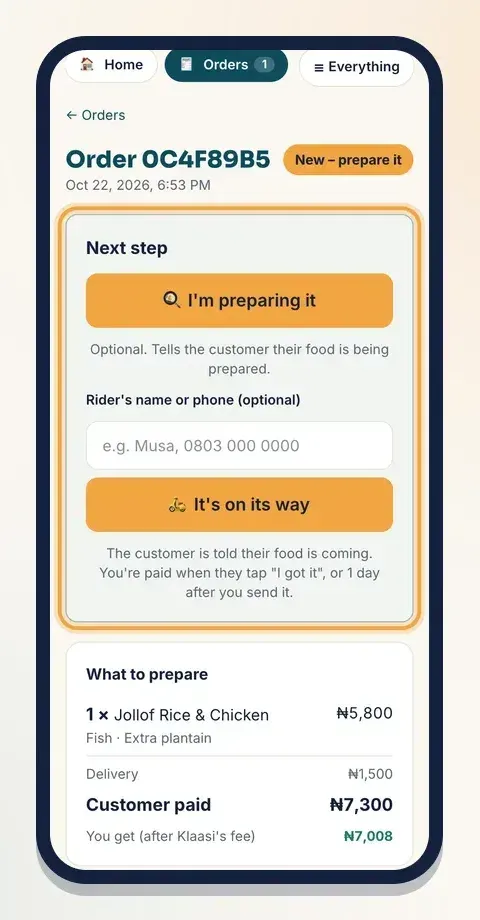
When an order comes in, you need to know exactly what to cook, where it goes and whether it's paid. A good order screen shows:
- Each dish with the chosen protein and extras.
- Delivery or pick-up, and the delivery fee.
- What the customer paid and what you keep.
- The next step: preparing, on its way, ready for pick-up.
Tell the customer when the food is packed and when it leaves. People wait more patiently when they know what's happening. More on this in how to manage orders and delivery on Klaasi.
Step 6: Get more orders
- Post your menu daily on WhatsApp status, especially before lunch and dinner.
- Show the food being made. Short videos of jollof in the pot or a cake being decorated sell.
- Ask for reviews after every order and share them.
- Run simple offers: a combo, a lunch deal, free drink on Fridays.
- Serve offices and events. One office lunch order can be worth ten single plates.
- Be reliable. Being on time, every time, beats being cheap.
Quick checklist
- Check food rules where you live and keep your kitchen clean.
- Build a short menu with sections, photos and clear descriptions.
- Add choices for proteins, drinks and extras.
- Share a menu link; keep WhatsApp for questions.
- Set delivery areas, fees, pick-up and opening hours.
- Price each portion from its real cost, then add profit.
- Update customers at every step and ask for reviews.
Selling food online is hard work, but it gets much easier when orders arrive complete and paid. Start your free Klaasi menu and share the link with your first customers today.
What to do next
Start selling on Klaasi, free
Your shop, courses, live classes and community in one place. Buyers pay in naira or dollars.
Open my free shopKeep reading
Create an online course for free: plan it, record it on your phone, sell it
You don't need a studio or expensive software to make a course. Here's how to plan it, record lessons on your phone, structure modules and start selling, at no upfront cost.
Start an online business from your phone: a beginner's plan
No laptop, no office, no big budget. Here's how to pick an idea, test it, set up a shop, take payments and get your first customers using only your phone.
Selling ebooks online: write, price, design and market your first ebook
From picking a topic people will pay for to pricing, covers, delivery and marketing: a step-by-step guide to selling your own ebook online.