How to manage orders and delivery on Klaasi (and when you get paid)
Pack, send, done. See how orders move from To do to Done, what your customer sees at each step, when your money is released and what happens if there's a problem.
When you sell clothes, gadgets, food or anything else you deliver yourself, every paid order lands on your Orders page. This guide shows you how to move an order from "new" to "done", what your customer sees at each step, when Klaasi releases your money, and what happens if a customer says something went wrong.
The pictures use a demo clothing shop, Kulture Rack, and one real test order for a hoodie.
How the money works (in one minute)
When a customer pays online, the money doesn't go straight to your wallet. Klaasi holds it until the order reaches the customer. That's what makes strangers comfortable paying a shop they've never bought from before.
Your money is released when either of these happens first:
- The customer taps I got it on their order page, or
- A set number of days pass after you tap I've sent it, and the customer hasn't reported a problem.
How many days depends on the order:
- Food: 1 day after it's sent.
- Pick-up, or delivery inside your own state: 2 days.
- Delivery to another state in Nigeria: 4 days.
- Delivery outside Nigeria: 10 days.
The order page always tells you the exact number for that order, so you never have to guess. After the money is released it shows in your wallet. See How to get paid and withdraw on Klaasi.
Step 1: Open your Orders page
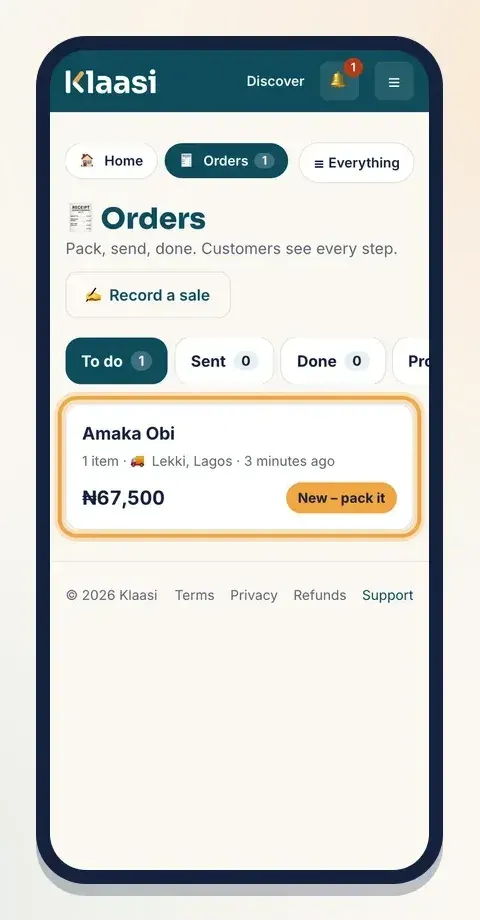
Tap Orders in your dashboard. A small number beside it tells you how many new orders are waiting.
The page has four tabs:
- To do: paid orders you still need to pack and send.
- Sent: orders on their way to the customer.
- Done: delivered or collected.
- Problems: orders where the customer reported a problem, or that were cancelled.
Each order shows the customer's name, how many items, where it's going (or 🏬 Pick-up), how long ago it was paid, the total, and its status, like New – pack it.
Step 2: Open the order and pack it
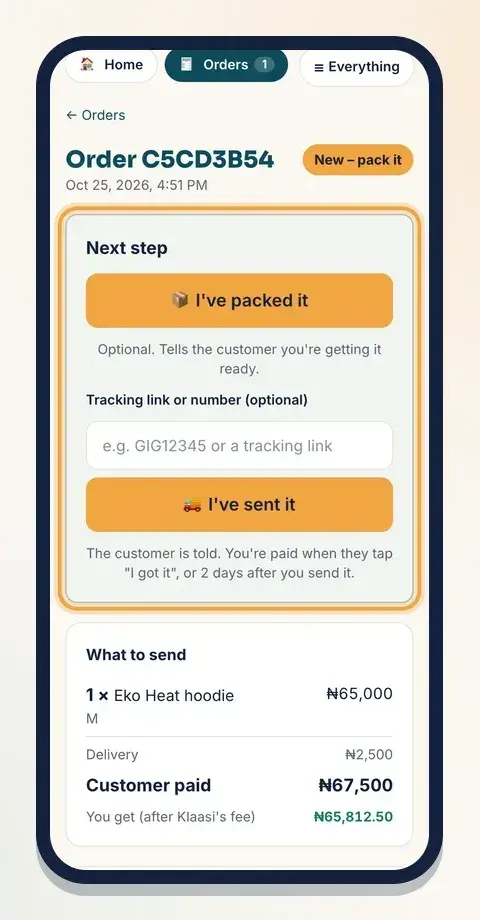
Tap the order. At the top is a box called Next step with one big button for what to do now. Under it you'll find:
- What to send: each item, its size or colour, the delivery fee, what the Customer paid, and You get (after Klaasi's fee).
- Send to: the customer's name, phone number, a Message customer on WhatsApp link, the full address and any note they left (like "Please call when you arrive").
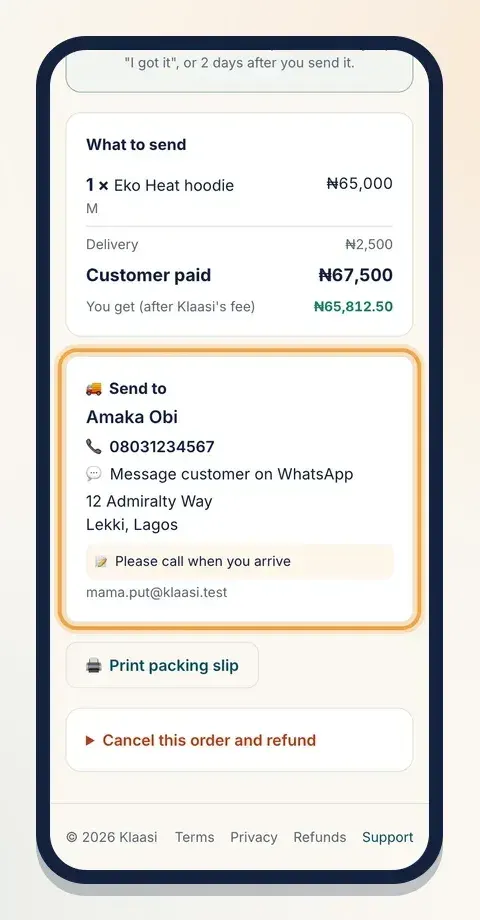
Tap 🖨️ Print packing slip if you want a paper copy to put in the parcel.
When you've packed it, tap 📦 I've packed it. This step is optional. It tells the customer you're getting their order ready.
Step 3: Send it and add tracking
When the parcel leaves your hands:
- If your delivery company gave you one, type the number or link into Tracking link or number (optional).
- Tap 🚚 I've sent it.
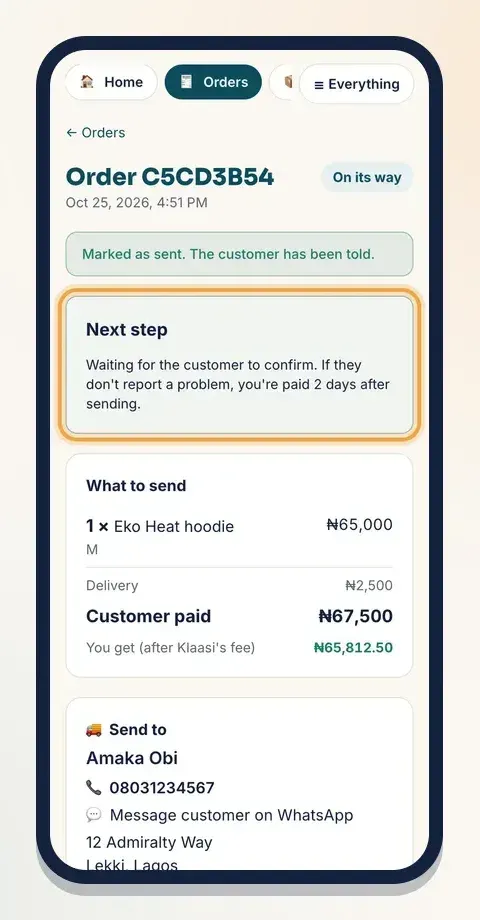
You'll see "Marked as sent. The customer has been told." The customer gets an alert and an email saying their order is on its way, with the tracking number if you added one.
The Next step box now says how many days until you're paid if the customer doesn't report a problem.
Pick-up orders
If the customer chose pick-up, the buttons change:
- Tap 🏬 It's ready for pick-up. The customer is told they can come.
- When you hand it over, tap 🤝 Customer collected it.
Tapping "collected" doesn't release the money on its own. Klaasi asks the customer to confirm. If they say nothing, you're paid after the waiting days (2 days for pick-up, 1 for food). This protects honest sellers and honest buyers.
What your customer sees
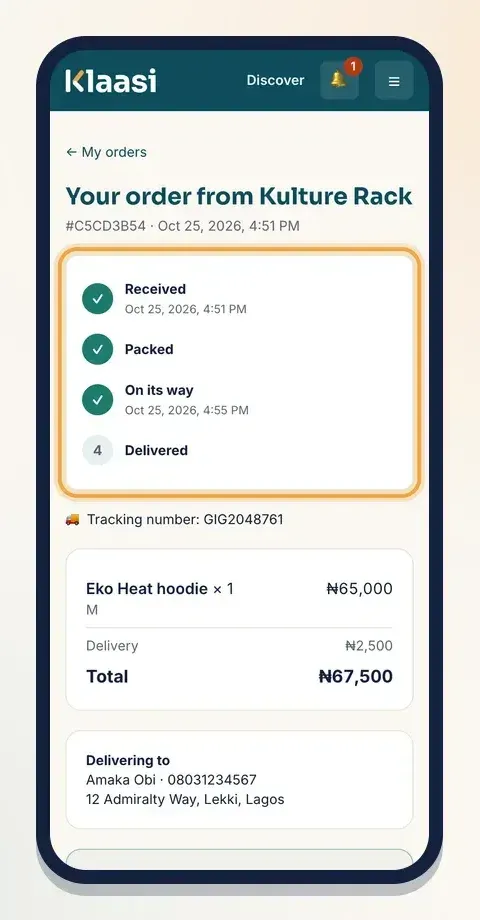
Your customer has their own order page. They reach it from My orders or the link in their email. Guests who paid without an account get a private link.
At the top is a simple progress line: Received, Packed, On its way, Delivered, with the date and time of each step. For food it reads Being prepared and Out for delivery; for pick-up, Ready for pick-up and Collected. If you added tracking, they see it under the steps.
Below that is a box asking Did your order arrive? with an I got it button. Tapping it marks the order delivered and releases your money. They also see the date by which they should tell Klaasi if it hasn't arrived.
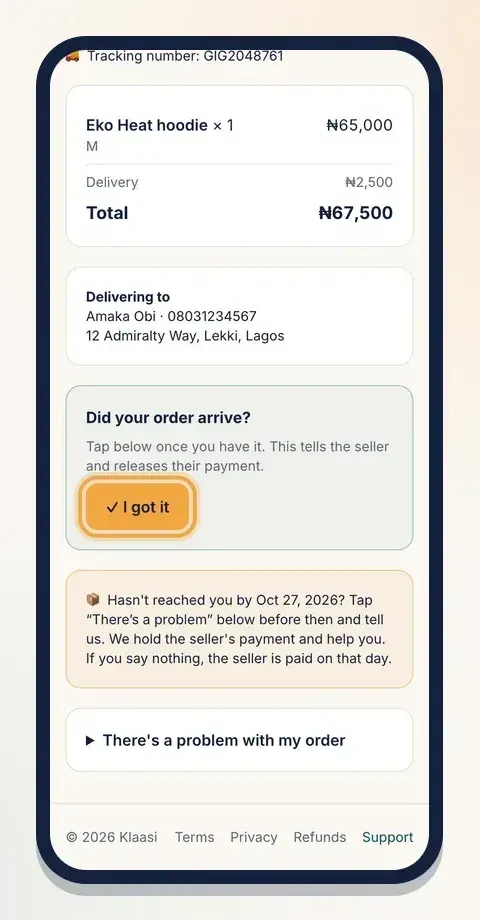
Tip: when you deliver in person, politely ask the customer to tap I got it. You'll be paid the same day instead of waiting.
When a customer reports a problem
If something goes wrong (it didn't arrive, wrong size, damaged), the customer opens There's a problem with my order, writes what happened and taps Send to Support.
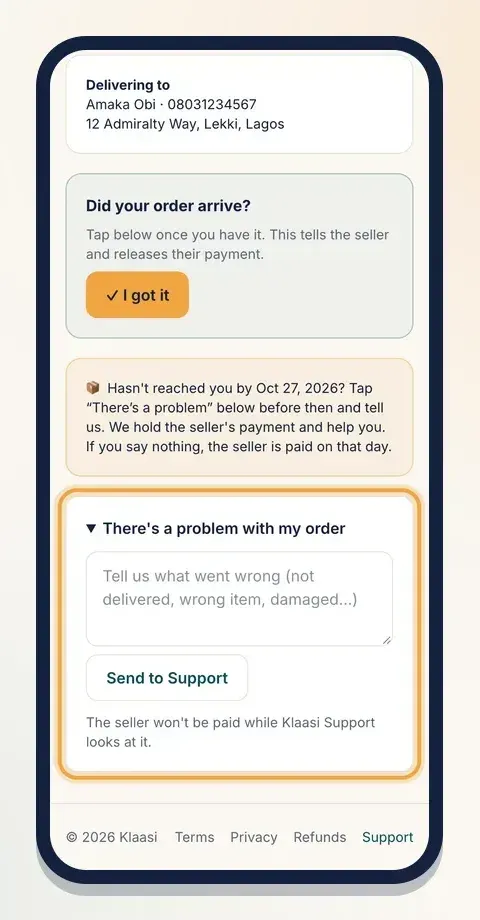
Then:
- The order moves to your Problems tab and you get an alert.
- Your money for that order stays held. Other orders aren't affected.
- Klaasi Support looks at it and contacts you. Reply quickly and share proof, like a delivery photo or the tracking page.
- If the order really was delivered, Support marks it delivered and your money is released. If it wasn't, the customer gets their money back.
A customer can only report a problem before the money has been released.
If you can't send an order
Sold out of that size? Can't deliver to that area? The shop owner can open Cancel this order and refund, write why (the customer sees this), and tap Cancel and refund in full. The customer gets all their money back. You pay the refund, including the payment cost, so check your stock before you sell. You can only cancel before the order is sent.
Don't leave orders waiting
- If a paid order hasn't been sent after 2 days, Klaasi reminds you.
- If it still hasn't been sent 7 days after payment, the customer can tell Klaasi Support from their order page, and Support checks with you.
Sending fast, and tapping I've sent it straight away, is the quickest way to get paid and get good reviews.
Sales you make outside Klaasi
Sold something at a market, in your shop or by bank transfer? Tap ✍️ Record a sale on the Orders page. It keeps your stock and sales numbers right. No money moves through Klaasi for these sales, so it doesn't add money to your wallet.
Common questions
Do I have to tap I've packed it? No. It just keeps the customer informed. You can go straight to I've sent it.
Where do I see the money from an order? While it's held, it shows as pending in your wallet. Once the customer confirms, or the waiting days pass, it becomes available to withdraw.
What to do next
Start selling on Klaasi, free
Your shop, courses, live classes and community in one place. Buyers pay in naira or dollars.
Open my free shopKeep reading
How to use the Klaasi developer API, webhooks and AI tools (MCP)
Connect your shop to your own website, Zapier, Make or an AI assistant. Create an API key, pick its permissions, receive signed webhooks for every sale and check them safely.
How to handle refunds and support as a seller on Klaasi
Klaasi has one refund policy for every shop. Buyers message Support, you reply with your side, and Klaasi decides using real evidence. Here's how it works and how to answer a refund request.
How to add team members to your Klaasi shop (and what each role can do)
Invite a helper by email and give them the right role: Editor, Support or Finance. Each role sees only what it needs, and only you can move money. Here's how.