How to collect and show reviews on Klaasi (real buyers only)
Klaasi reviews come only from people who really bought and received your product. See how buyers rate, where the stars show, and how to reply.
Before someone pays a shop they don't know, they look for one thing: what other buyers said. Klaasi reviews are built so people can trust them, because only real buyers can leave one. This guide shows who can review, how buyers do it, where the stars appear on your shop, how to reply, and what to do when a review isn't fair.
The pictures use two demo shops: Kulture Rack (clothes) and Ada Designs (digital products).
Why real reviews matter
Most people shopping online have been burned at least once: the dress that looked nothing like the photo, the course that was three blurry videos. A few honest words from someone who bought before them can be the reason they pay you today instead of tomorrow. Stars on your product cards also help your products stand out in Discover and in your own shop.
Who can leave a review
Only people who really bought and received your product:
- Digital products (courses, ebooks, files, live classes, coaching): the buyer must have paid access.
- Shop goods and food: the order must be Delivered or Collected, and not refunded.
Each buyer can leave one review per product: 1 to 5 stars and, if they want, some words (up to 2,000 characters). They can come back and change it any time.
If a buyer is refunded, their review stops showing. The review box only appears for people who bought, so a stranger can't leave a review.
Every review shows the buyer's first name and the first letter of their last name (like "Bola A."), never their email. If they haven't set a name, it shows "A buyer". Reviews on digital products carry a ✓ Verified buyer mark, and reviews on shop items say ✓ Bought it.
How buyers leave a review
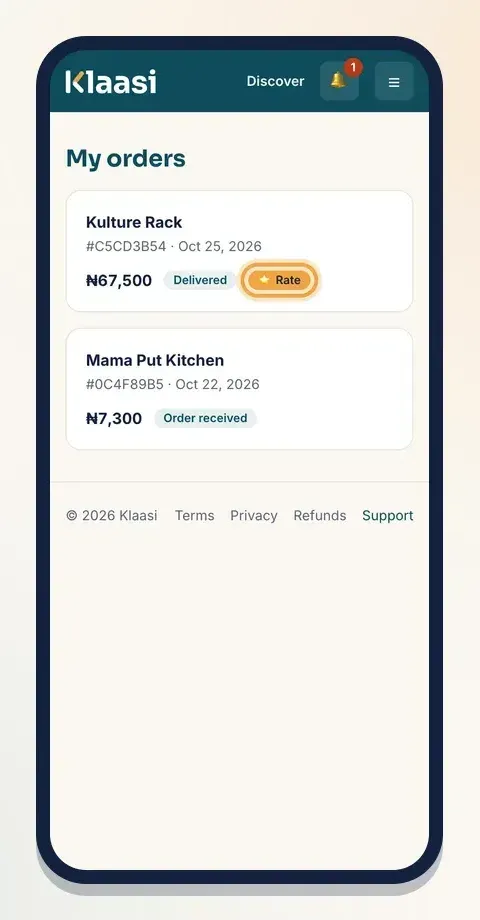
For shop goods and food, the buyer confirms the order arrived by tapping I got it. Their My orders page then shows a ⭐ Rate label on that order.
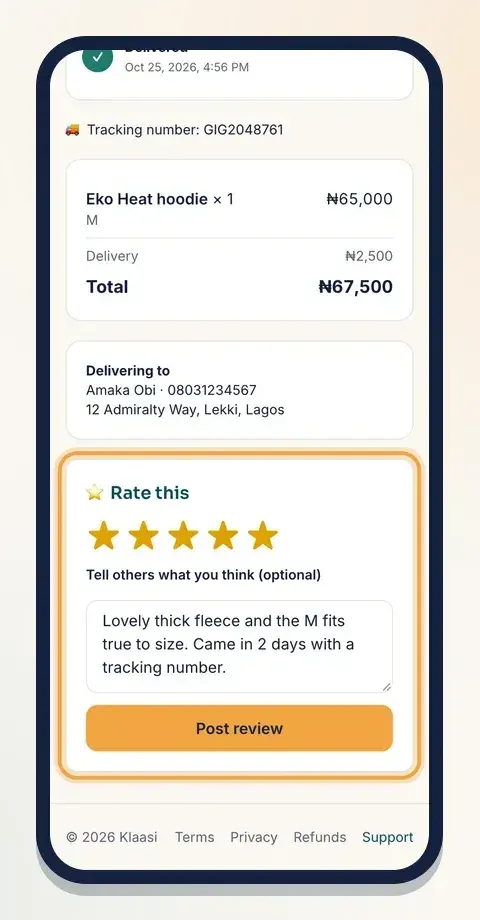
They open the order and find ⭐ Rate this at the bottom:
- Tap a star (5 is best).
- Write a few words in Tell others what you think (optional).
- Tap Post review.
They'll see "Thank you! Your review is up."
A guest who paid without an account sees Sign in to rate what you got on their order page. One tap and their email is filled in for them.
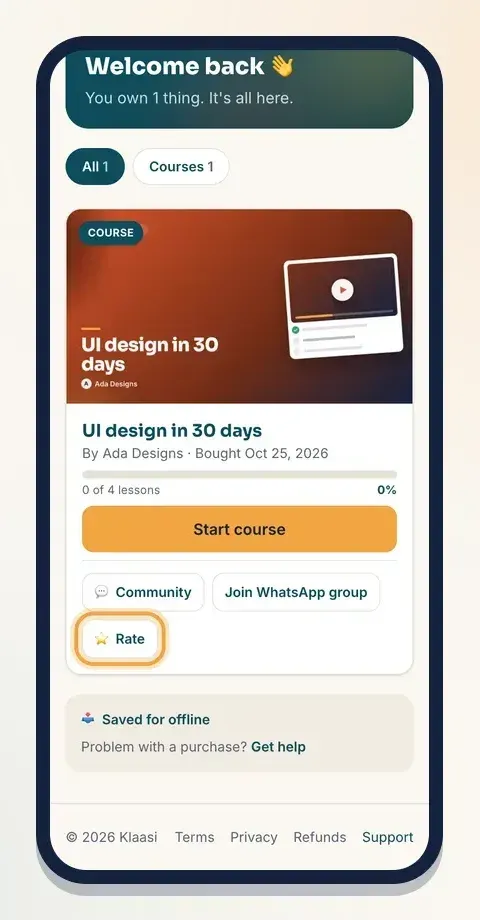
For digital products, buyers find ⭐ Rate on the product's card in their library. It opens the product page, where the same Rate this box is waiting.
The order page and how delivery works are explained in How to manage orders and delivery on Klaasi.
Where reviews show
You don't need to switch anything on. As soon as a product has a review, Klaasi shows it in these places:
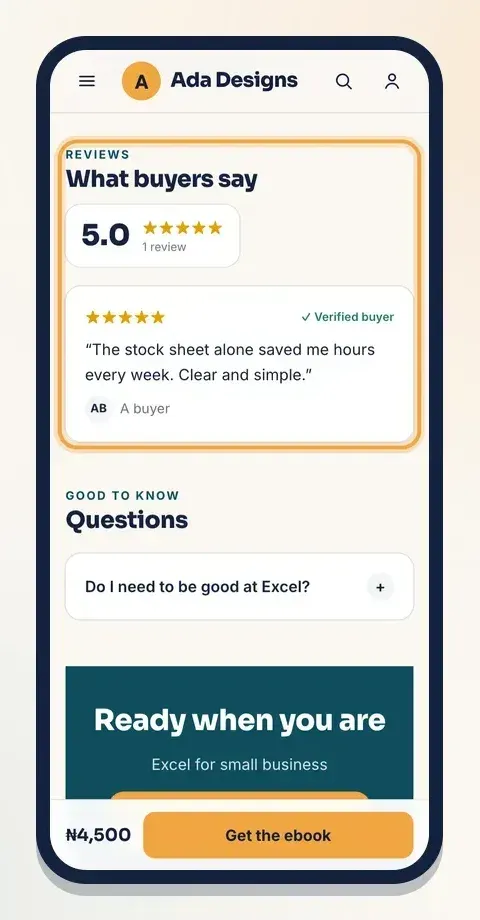
On the product page. A What buyers say section shows the average (like 5.0), the stars, how many reviews, and the newest reviews with your replies.
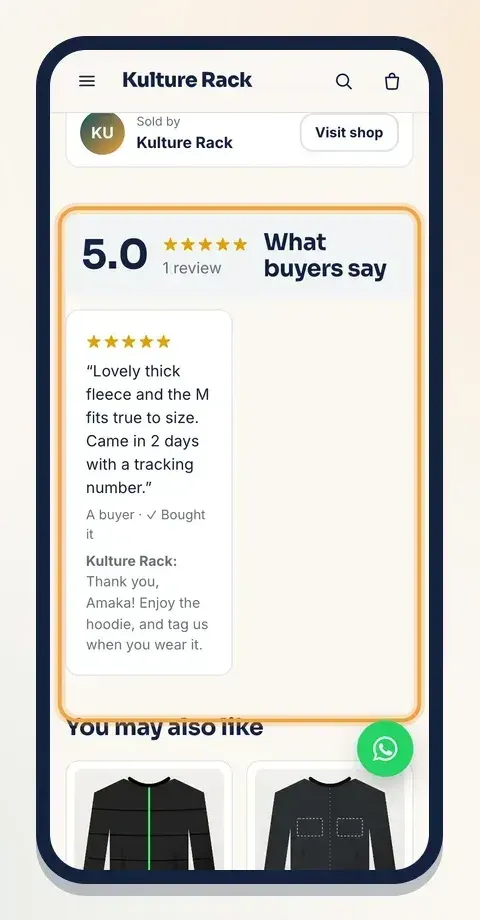
Digital product pages show the same thing in the style of your product page design, with the Verified buyer mark.
On product cards. Your shop and Discover show ★ and the average next to products that have reviews. Products without any yet show New.
On your shop's home page. The shop header can show your overall rating and the number of reviews, next to your number of products and customers.
In a Reviews block on your website. In the website editor, add the Reviews block ("What customers say"). Set it to Real reviews and it fills itself with your buyers' latest reviews. There's also a Write my own option for quotes you collected elsewhere, like WhatsApp messages from customers. Only use real words from real customers there. See How to edit your Klaasi website.
On Google. Product pages tell search engines about your rating, so your stars can appear in search results. Google decides when to show them.
How to see and reply to reviews
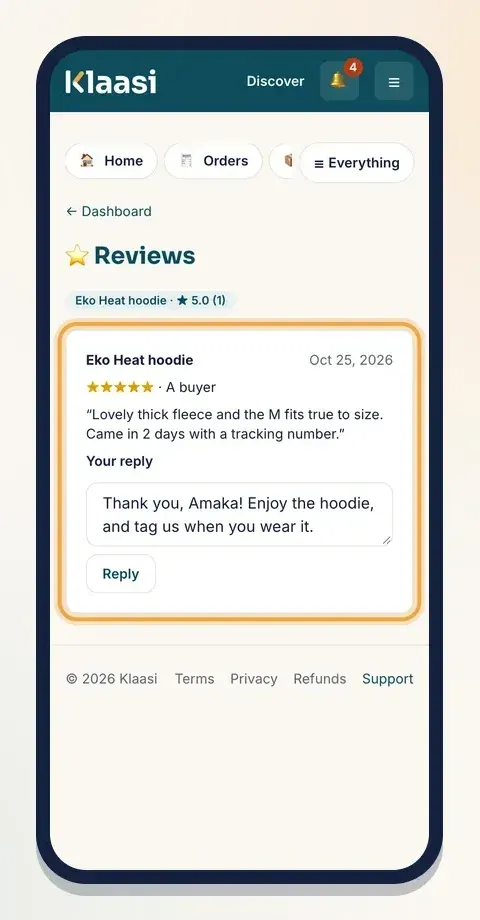
Open Reviews under Grow in your dashboard. At the top you'll see each product with its average and count, like "Eko Heat hoodie · ★ 5.0 (1)". Below are all your reviews, newest first.
To reply:
- Type in the box under the review (for example "Thank you! Enjoy the hoodie.").
- Tap Reply.
Your reply shows under the review on the product page, with your shop's name. You can change it later; the box then says Your reply.
Team members with the Support role can see and reply to reviews too. See How to add team members to your shop.
What to do about a bad review
You can't delete or edit a buyer's review, and neither can anyone on your team. That's what makes reviews worth reading. Here's what works instead:
- Reply calmly and helpfully. Say sorry for the trouble, explain what you'll do, and invite them to message you. Future buyers read your reply as much as the review.
- Fix the real problem. If three people say the size runs small, update your size guide.
- If a review breaks the rules (insults, someone's personal details, spam, or it's clearly about a different shop), contact Klaasi Support. Hiding a review is a moderation decision made by Klaasi's team, not by the seller. A hidden review stops counting in your average.
How to get more reviews
- Deliver fast and tap I've sent it straight away. Customers can only review shop goods after they confirm delivery.
- Ask politely. When you deliver in person, ask the customer to tap I got it and leave a rating.
- Remind them in your emails. Add a short "How was it? Tap Rate in your library" message to your follow-up emails. See How to send email sequences and abandoned cart emails.
- Reply to every review. People are more likely to review shops that answer.
- Never pay for reviews or post fake ones. Klaasi only counts real buyers, so fake reviews can't appear anyway.
Common questions
Can a buyer change their review? Yes. If they open the product or order again, the box says Your review with their stars and words filled in. They can change them and post again. It replaces the old review instead of adding a second one.
Why can't my customer see the Rate box? For shop goods and food, the order must be marked delivered first. Ask them to tap I got it on their order page. For digital products, they need to be signed in with the same email they bought with.
Why doesn't a review show any more? Either the buyer was refunded, or Klaasi's team hid it after a report. Reviews from refunded buyers stop counting in your average too.
Do reviews from my old website or Instagram count? They can't be added as Klaasi reviews, because only buyers on Klaasi can leave those. You can show real customer quotes in the Reviews block on your website using Write my own.
What to do next
Start selling on Klaasi, free
Your shop, courses, live classes and community in one place. Buyers pay in naira or dollars.
Open my free shopKeep reading
How to use the Klaasi developer API, webhooks and AI tools (MCP)
Connect your shop to your own website, Zapier, Make or an AI assistant. Create an API key, pick its permissions, receive signed webhooks for every sale and check them safely.
How to handle refunds and support as a seller on Klaasi
Klaasi has one refund policy for every shop. Buyers message Support, you reply with your side, and Klaasi decides using real evidence. Here's how it works and how to answer a refund request.
How to add team members to your Klaasi shop (and what each role can do)
Invite a helper by email and give them the right role: Editor, Support or Finance. Each role sees only what it needs, and only you can move money. Here's how.