How to set up affiliates for your product on Klaasi
Let other people sell your product for a commission. Choose a percentage or a fixed amount, list it in the Klaasi affiliate shop or send a private invite link, and Klaasi tracks every sale.
The more people talk about your product, the more you sell. Affiliates (Klaasi calls them partners) are people who share your product with their own audience and earn a commission when someone buys through their link.
You only pay when a sale happens. No sale, no commission.
By the end of this guide you will be able to turn on affiliates for a product, set a fair commission, choose between the public affiliate shop and private invite links, and pause partners if you need to.
How affiliates work on Klaasi
Here's the whole idea in five lines:
- You set a commission on a product, for example 30%.
- A partner gets their own link to your product and shares it on WhatsApp, Instagram, TikTok or anywhere.
- Someone clicks the link and buys. Klaasi remembers the partner for the number of days you choose, so the sale still counts if the buyer comes back later.
- The commission comes out of your share of the sale. The buyer pays your normal price, never more.
- The partner is paid after the buyer's refund window closes. If the buyer gets a refund, the commission for that sale is cancelled.
Klaasi tracks clicks and sales for you. You don't need any other tool.
Two ways to find partners
1. The Klaasi affiliate shop (Pro and Business). This is a public page where anyone can browse products and pick ones to promote. Listing your product there means people you've never met can start selling it. Klaasi reviews each listing before it shows.
2. Private invite links (every plan). You send your own link to people you choose: a friend with a big WhatsApp following, a past student, a blogger in your niche. It works even when the product isn't in the affiliate shop.
What about fees? Klaasi earns its normal fee on every sale, with or without a partner. On sales that come from the public affiliate shop, Klaasi also keeps a small 2% shop fee, taken from the partner's commission, not from you. Private invite links have no shop fee.
Step 1: Open Selling tools for your product
- Open your dashboard and tap Products.
- Pick the product.
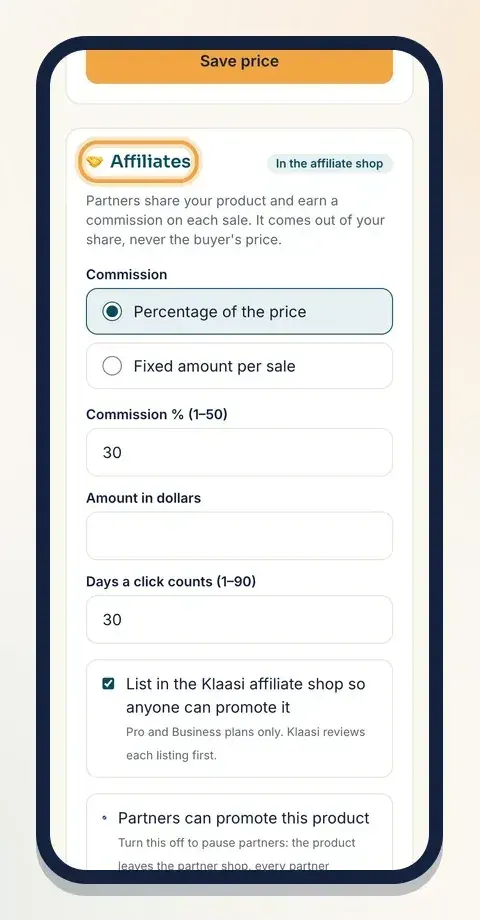
- Open Selling tools and scroll to Affiliates.
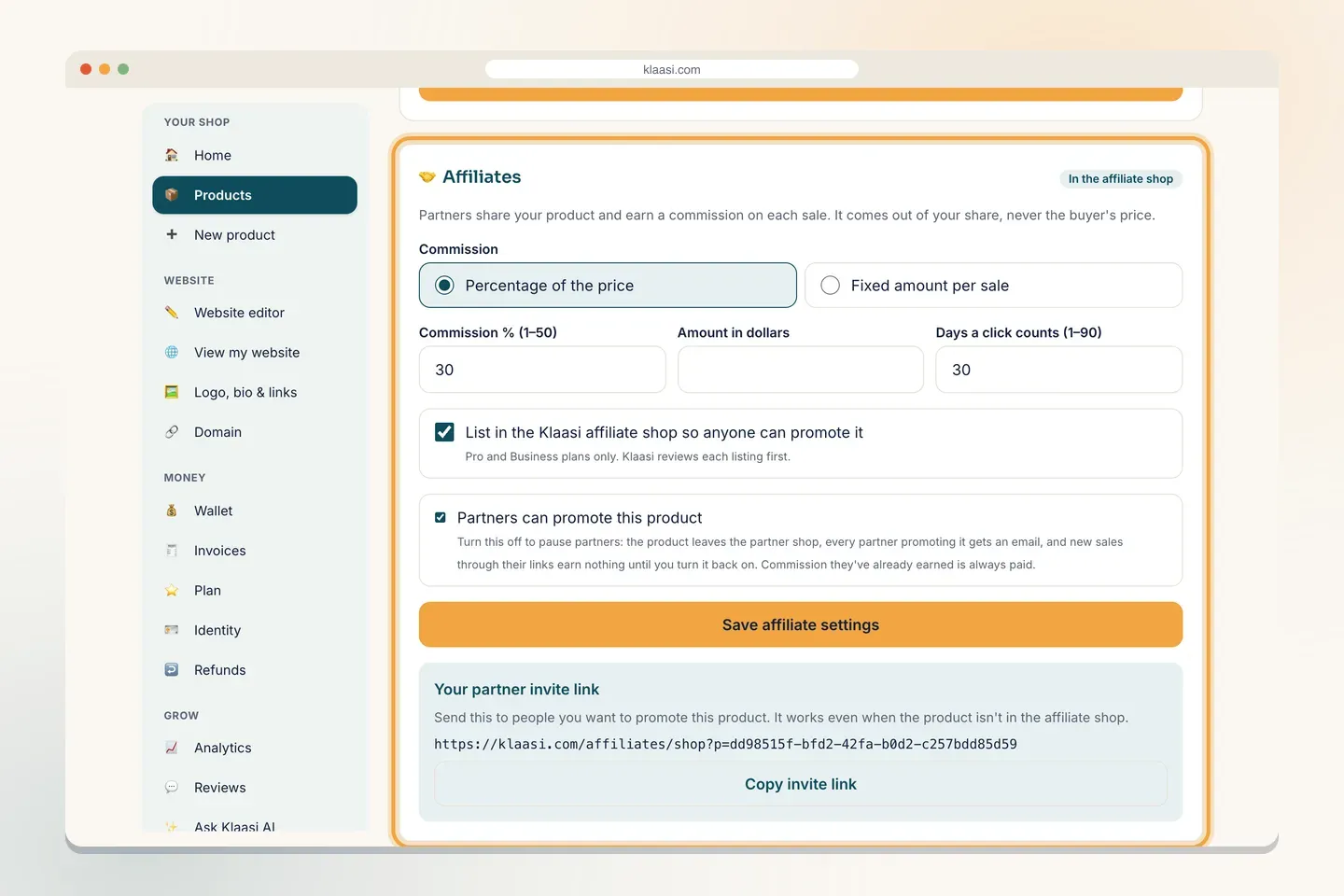
At the top of the box it says: "Partners share your product and earn a commission on each sale. It comes out of your share, never the buyer's price."
Step 2: Choose how partners are paid
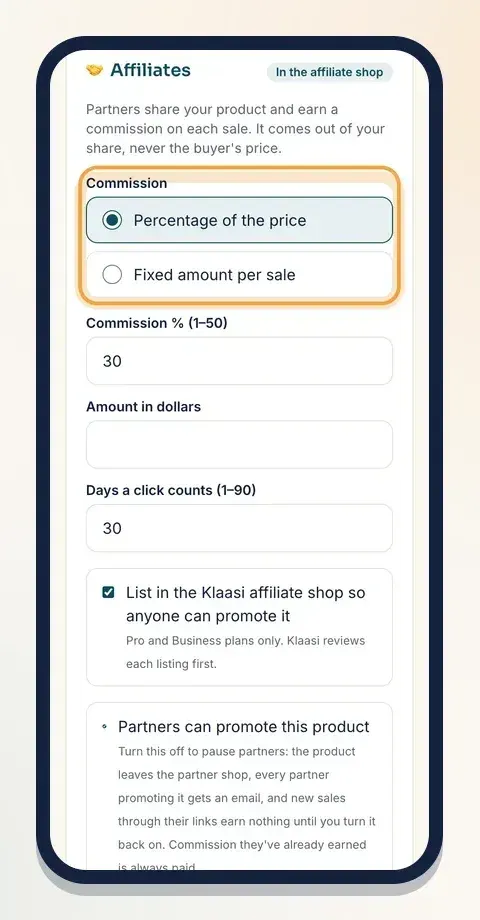
Under Commission, pick one:
- Percentage of the price: the partner earns a share of each sale. Type it in Commission % (1–50). Most creators start between 20% and 40%.
- Fixed amount per sale: the partner earns the same amount on every sale, in your product's currency. It can be up to half the price.
The highest commission is 50%. If you type more, Klaasi says: "Commission must be 1% to 50% (or a fixed amount up to half the price)."
How to pick a fair number: think about what the partner gets for a sale and what you keep. On a digital product, you have no cost per copy, so a generous commission often brings far more sales than it costs. Partners compare products in the shop by what they earn, so a higher rate gets noticed.
Step 3: Set how long a click counts
In Days a click counts (1–90), choose how long Klaasi remembers the partner after someone clicks their link. The default is 30 days.
Example: a buyer clicks a partner's link on Monday, thinks about it, and buys 10 days later. With 30 days, the partner still earns. With 7 days, they don't.
Longer is fairer to partners and makes them more willing to promote you. 30 days is a good start.
Step 4: Choose the affiliate shop or private only
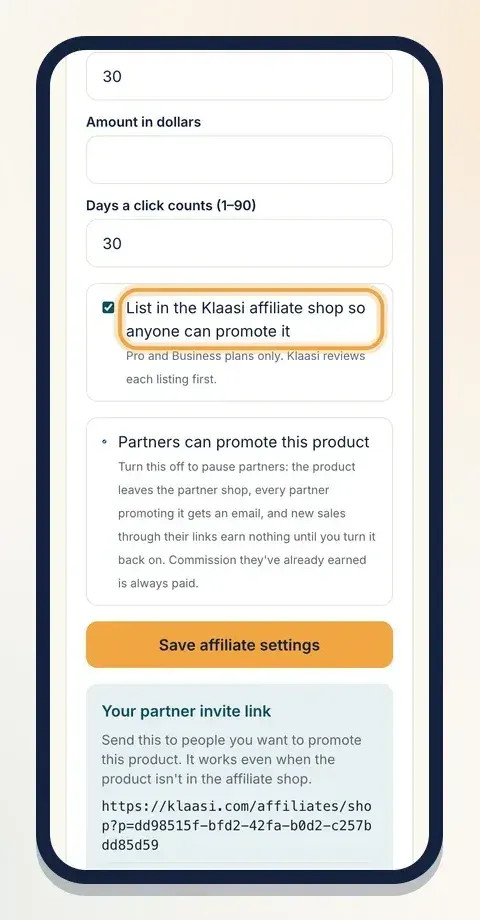
Tick List in the Klaasi affiliate shop so anyone can promote it if you want your product in the public shop. This needs the Pro or Business plan, and Klaasi reviews each listing first.
Leave it unticked if you only want people you invite.
Make sure Partners can promote this product is ticked. Then tap Save affiliate settings.
After saving, a label at the top of the box shows where you stand:
- Not in the shop: private invite links only.
- Waiting for Klaasi review: you asked to be listed; Klaasi is checking.
- In the affiliate shop: anyone can now find and promote it.
- Not approved for the shop: it wasn't approved; private links still work.
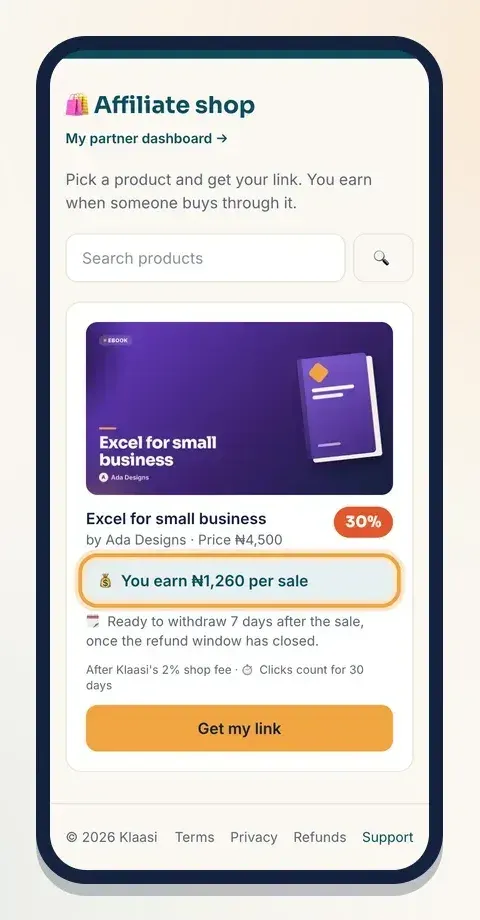
Here's what partners see once your product is in the shop: the price, what they earn per sale, when the money is ready, and how long clicks count.
Step 5: Send your private invite link
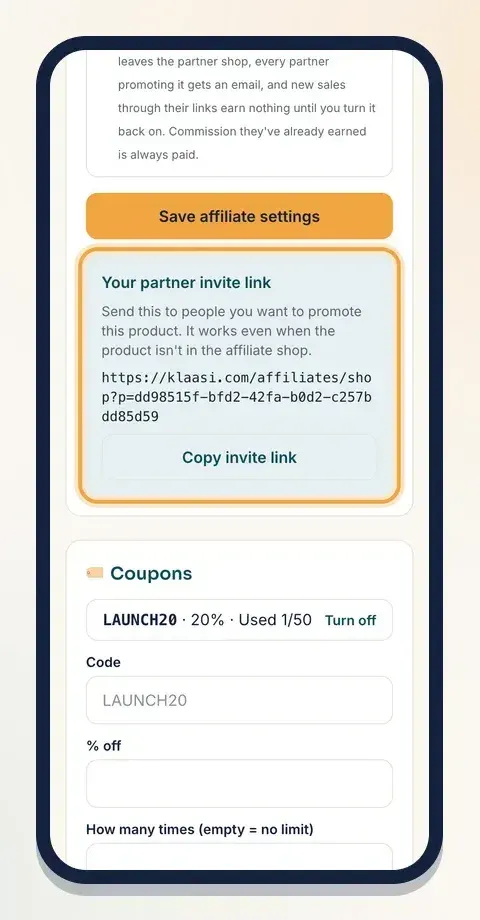
Once affiliates are on, a box called Your partner invite link appears under the save button. It says: "Send this to people you want to promote this product. It works even when the product isn't in the affiliate shop."
Tap Copy invite link and send it on WhatsApp, by email or in a DM. When the person opens it, they sign in (joining is free) and tap Get my link. Their own tracked link is ready straight away.
Step 6: Give your partners what they need
Partners sell more when you make it easy. On their partner dashboard, each link comes with ready Marketing banners carrying their own link and QR code. Point them to it, and also:
- Tell them who the product is for, in one sentence.
- Share two or three results or screenshots they can post.
- Tell them about any discount and when it ends.
Pausing or changing your program
Need to stop for a while? Untick Partners can promote this product and save. The product leaves the partner shop, every partner promoting it gets an email, and new sales through their links earn nothing until you turn it back on. Commission they've already earned is always paid.
You can change the rate any time. A rate is locked the moment a sale happens, so a change only affects future sales. Partners can trust that, and so can you.
When partners are paid
Partner commissions are held until the buyer's refund window has closed, then they're ready to withdraw. Partners are paid every week to their bank, mobile money or USDT wallet. If a buyer gets a refund, that sale's commission is cancelled, so you never pay for a sale you didn't keep.
A quick example
Say your ebook costs ₦4,500 and you set a 30% commission with 30 days for clicks.
- A partner finds it in the affiliate shop and shares their link on WhatsApp.
- A buyer clicks on Monday and buys on Thursday. The sale counts for the partner, because it's within 30 days.
- The partner's commission is 30% of ₦4,500, which is ₦1,350. Because the sale came through the affiliate shop, Klaasi's 2% shop fee (₦90) comes out of that, so the partner earns ₦1,260.
- The ₦1,350 commission comes out of your share of the sale, next to Klaasi's normal fee. The buyer paid ₦4,500, the same as anyone else.
If the same partner had joined through your private invite link, there'd be no shop fee and they'd earn the full ₦1,350.
Rules that protect you
- No spam, no fake reviews.
- No buying through your own link. And you can't become a partner for your own product.
- Where a sale came from is decided by Klaasi's server, not the browser, so nobody can fake a shop sale or a partner sale.
What to do next
Start selling on Klaasi, free
Your shop, courses, live classes and community in one place. Buyers pay in naira or dollars.
Open my free shopKeep reading
How to use the Klaasi developer API, webhooks and AI tools (MCP)
Connect your shop to your own website, Zapier, Make or an AI assistant. Create an API key, pick its permissions, receive signed webhooks for every sale and check them safely.
How to handle refunds and support as a seller on Klaasi
Klaasi has one refund policy for every shop. Buyers message Support, you reply with your side, and Klaasi decides using real evidence. Here's how it works and how to answer a refund request.
How to add team members to your Klaasi shop (and what each role can do)
Invite a helper by email and give them the right role: Editor, Support or Finance. Each role sees only what it needs, and only you can move money. Here's how.