How to create coupon codes on Klaasi (and how buyers use them)
Make a coupon code like LAUNCH25 for any product, set how many people can use it and when it ends, and see how buyers type it in at checkout.
A coupon code is a short word your buyers type at checkout to pay less. "LAUNCH25" for 25% off in launch week. "VIP50" for your WhatsApp group. "THANKYOU" for people who bought from you before.
By the end of this guide you'll be able to make a coupon for any product, limit how many people can use it, give it an end date, turn it off when you're done, and explain to buyers exactly where to type it.
Coupons are on every plan, Free included.
Where coupons live
Every product has its own Selling tools page. That's where you'll find coupons, order bumps, pay in parts, pay what you want and more.
- Open your dashboard and tap Products.
- Find the product you want to discount.
- Tap Selling tools under it.
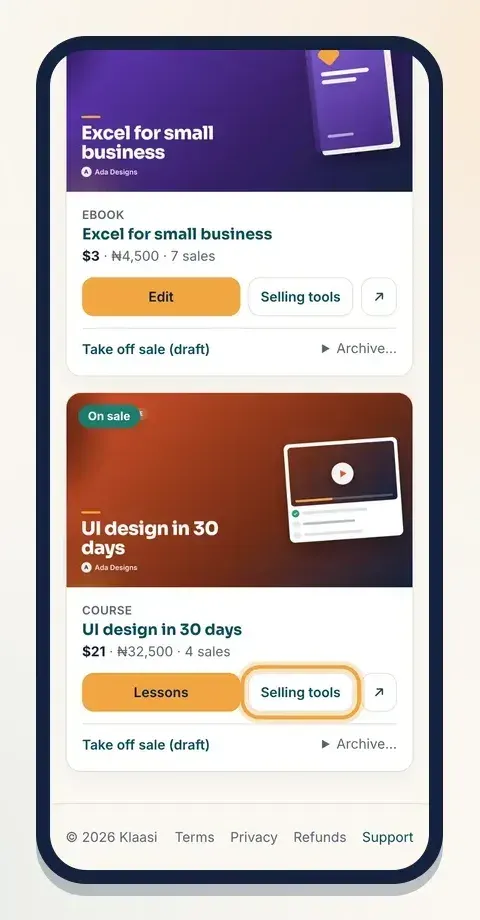
Scroll down until you see the Coupons box. If you haven't made any yet, it says No coupons yet.
Step 1: Fill in the coupon
The Coupons box has four fields:
- Code: the word buyers will type. Use 3 to 20 letters or numbers, with no spaces. Klaasi turns it into capital letters for you, so "launch25" becomes LAUNCH25.
- % off: how much cheaper the product gets, from 1 to 100. Type 20 for 25% off.
- How many times (empty = no limit): leave it empty to let anyone use it, or type 50 so only the first 50 buyers get the discount.
- Expires (optional): pick a date. The code works until the end of that day, then stops by itself.
Tap Add coupon.
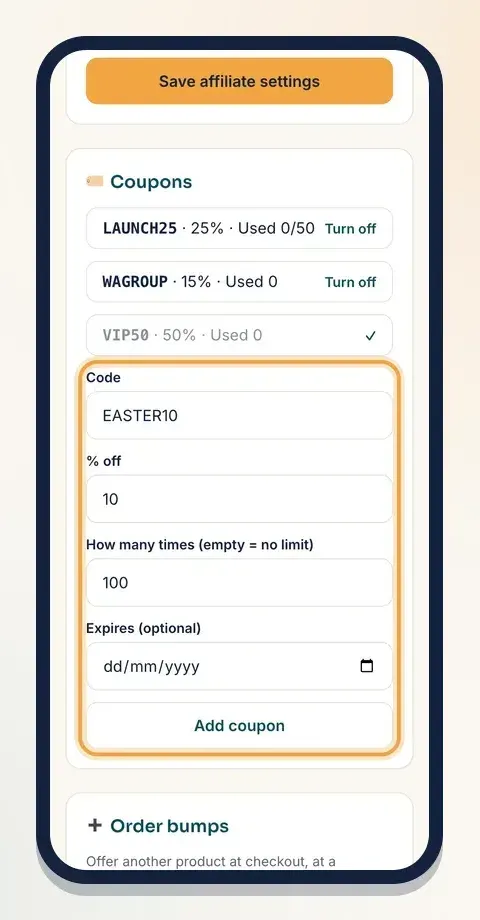
A few things to know:
- Each code can only exist once in your whole shop, even on different products. If you try to make LAUNCH25 a second time, Klaasi tells you You already have a coupon with that code.
- The code belongs to this one product. To give a discount on another product, open that product's Selling tools and make a coupon there too, with a different code.
- A 100% coupon makes the product free. The buyer gets it straight away, with no payment step. This is handy for gifting a course to a reviewer or a winner of a giveaway.
Step 2: Check your coupons
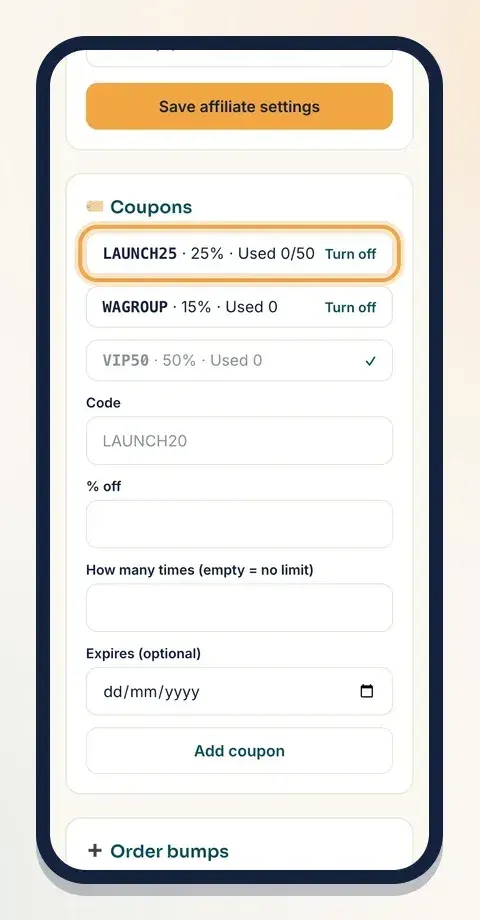
Your new coupon shows at the top of the Coupons box, like this:
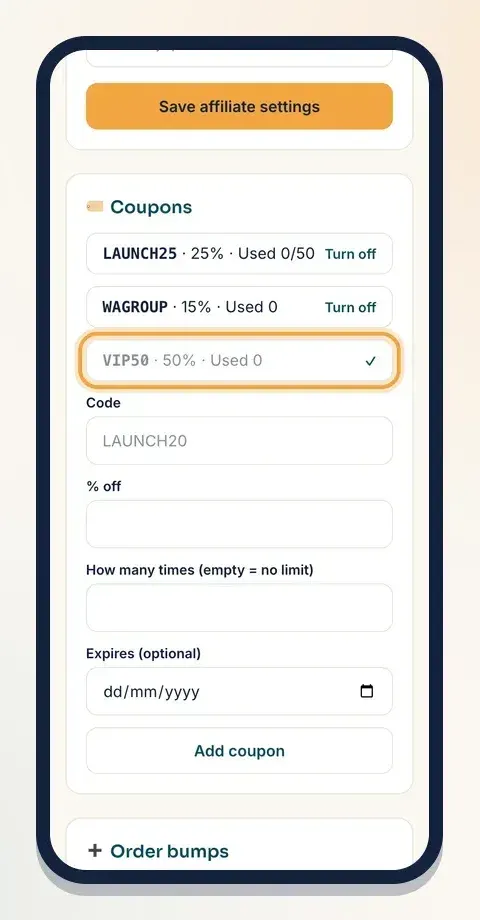
LAUNCH25 · 25% · Used 0/50
In the picture below you can also see WAGROUP (no limit) and VIP50, which is turned off. Each line tells you the code, the discount, and how many people have used it so far. If you set a limit, you see it after the slash. The number goes up each time someone pays with the code.
Step 3: Share the code
Klaasi doesn't send the code for you, so tell people about it where they already follow you:
- Post it on your WhatsApp Status, Instagram story or X: "Use LAUNCH25 for 25% off until Friday."
- Put it in your email list or Telegram group.
- Add it to your product description so visitors see it on the page.
Tip: make a different code for each place you post it (for example IG20 and WA20). The "Used" count then shows which place brings the most buyers.
How buyers use a coupon
On your product page, right above the buy button, buyers see a small link: Have a code? Enter it here. When they tap it, a box opens where they type the code. Then they tap the buy button as usual.
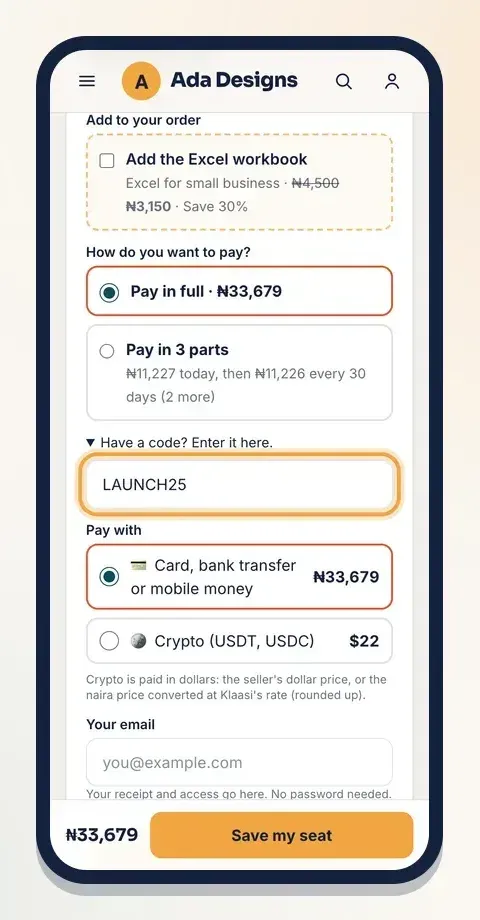
The discount is taken off before the payment screen, so they only ever pay the lower price.
If the code is wrong, used up, turned off or past its end date, the page shows That coupon code isn't valid or has expired. and nothing is charged.
Coupons in the cart
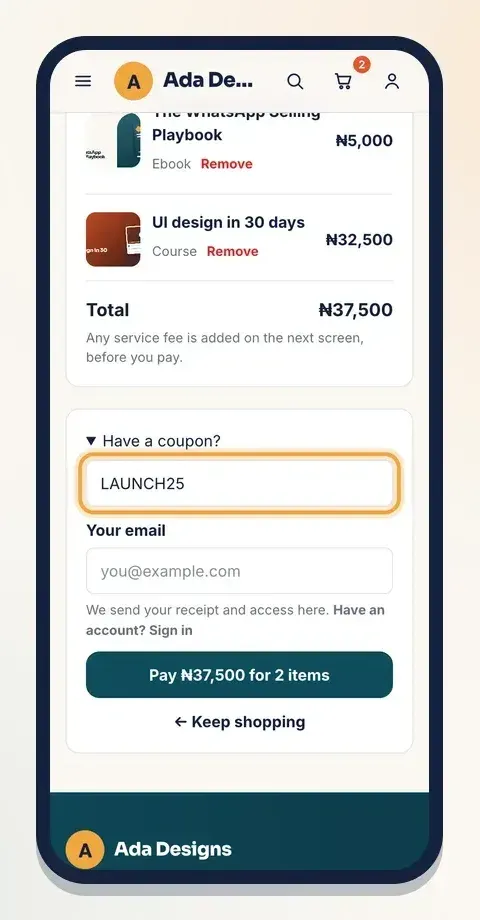
Buyers can add several of your products to a cart and pay once. The cart page has its own Have a coupon? box.
When a buyer types a code there, the discount goes to the product the coupon belongs to. The other items in the cart stay at their normal price. So if LAUNCH25 is for your course, the course is 25% off and your ebook in the same cart stays full price.
Step 4: Turn a coupon off
When the offer is over, or a code was shared too widely, you can stop it in one tap.
- Open the product's Selling tools.
- In the Coupons box, find the code.
- Tap Turn off next to it.
The line fades and the code stops working at once. Changed your mind? Tap the ✓ next to it to turn it back on. A coupon with an end date also stops by itself when the date passes, even if you never turn it off.
Coupon or discount: which one should I use?
Klaasi has two ways to lower a price:
- A discount shows to everyone. The old price is crossed out and the new price is next to it, with an optional countdown. Use it for a public sale. See how to set prices and discounts.
- A coupon is private. Only people who have the code pay less. Use it to reward a group, test which post sells more, or thank a past buyer.
Good coupon habits
- Give it an end date. "Ends Sunday" makes people act now.
- Keep the limit honest. If you say "first 30 people", set How many times to 30, and Klaasi stops it for you.
- Don't give away too much. Work out what you keep at the lower price before you share a big % off.
- Turn off old codes. Codes get shared around. Switch off anything you don't want used any more.
Common questions
Can a coupon take a fixed amount off, like ₦2,000 or $5? On the dashboard, coupons are a percentage off. Use the % that matches the amount you want.
Can one coupon work on all my products? Coupons made in Selling tools are for one product. Make one on each product you want to discount, each with its own code.
Can I delete a coupon? You can turn it off. It stays in the list so you can see how many times it was used.
Does a coupon work for buyers in other countries? Yes. The % comes off whatever price the buyer sees, in naira or dollars.
What to do next
- Show a public sale price with a countdown: How to set prices and discounts on Klaasi
- Offer a second product at checkout: How to add order bumps and bundles
- Remind people who left checkout without paying: How to send email sequences and abandoned-cart emails
Ready to make your first code? Open your dashboard and tap Products.
Start selling on Klaasi, free
Your shop, courses, live classes and community in one place. Buyers pay in naira or dollars.
Open my free shopKeep reading
How to use the Klaasi developer API, webhooks and AI tools (MCP)
Connect your shop to your own website, Zapier, Make or an AI assistant. Create an API key, pick its permissions, receive signed webhooks for every sale and check them safely.
How to handle refunds and support as a seller on Klaasi
Klaasi has one refund policy for every shop. Buyers message Support, you reply with your side, and Klaasi decides using real evidence. Here's how it works and how to answer a refund request.
How to add team members to your Klaasi shop (and what each role can do)
Invite a helper by email and give them the right role: Editor, Support or Finance. Each role sees only what it needs, and only you can move money. Here's how.