How to set prices and run discounts on Klaasi
Set one price in naira or dollars and Klaasi works out the other. Then run a sale with the old price crossed out, a % off tag and a countdown that ends by itself.
Pricing on Klaasi is simple on purpose. You type one price, in naira or in dollars, and Klaasi shows every buyer the right currency. When you want to run a sale, you add an old price and, if you like, an end time. Buyers see the old price crossed out, the new price, the % off and a countdown. When the time is up, the price goes back by itself.
This guide covers prices for digital products (courses, ebooks, files, live classes, coaching) and for shop items, and shows you how to run a discount from start to finish.
How prices work on Klaasi
- You set one price, in ₦ Naira or $ Dollars. Not both.
- Buyers in Nigeria pay in naira. Everyone else pays in dollars. Klaasi decides by where the buyer is, so you never add a currency switch.
- The other currency is worked out for you at Klaasi's rate, rounded up to the next ₦50 or the next 10 cents, so prices look neat.
- You still get your own price, minus fees. If you priced in naira, a buyer abroad pays in dollars but your share is worked out from your naira price.
Buyers in Ghana, Kenya, Tanzania and Uganda also see a rough amount in their own money under the dollar price, like "about GH₵ …", so they know what they're paying. They pay in dollars, and mobile money is converted for them at checkout.
Step 1: Set the price when you create a product
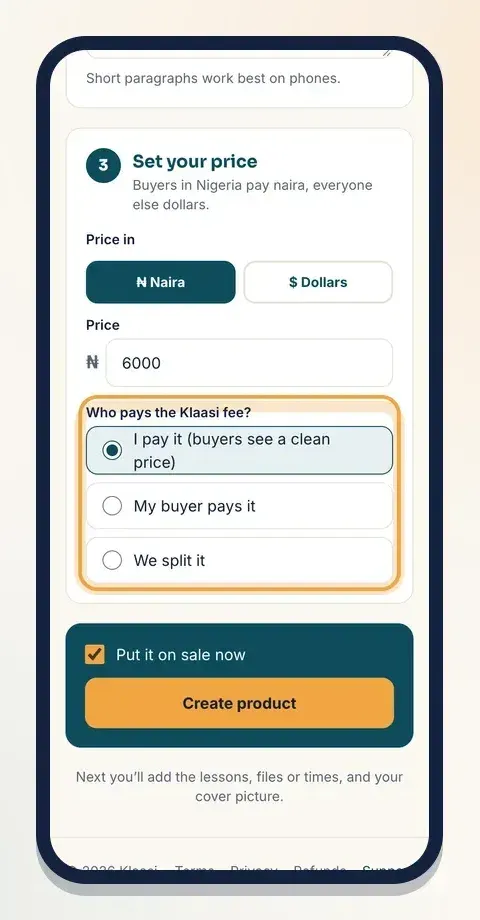
When you tap New product, step 3 is Set your price:
- Under Price in, tap ₦ Naira or $ Dollars. Choose the money you think in.
- Type the Price, like 5000 or 5,000 (or 5 for dollars).
- Read the line under it. If you priced in naira it says "Buyers outside Nigeria pay in dollars." If you priced in dollars it says "Buyers in Nigeria pay in naira." Either way it adds "You still get your … (minus fees)."
- Choose Who pays the Klaasi fee?:
- I pay it (buyers see a clean price). The most common choice.
- My buyer pays it. The fee is added on top at checkout.
- We split it.
Step 2: Change the price later
Open the product's Selling tools and find the Price & discount box. It works the same way: pick ₦ Naira or $ Dollars, type the price and tap Save price. You'll see "Price saved. Buyers see the new price now."
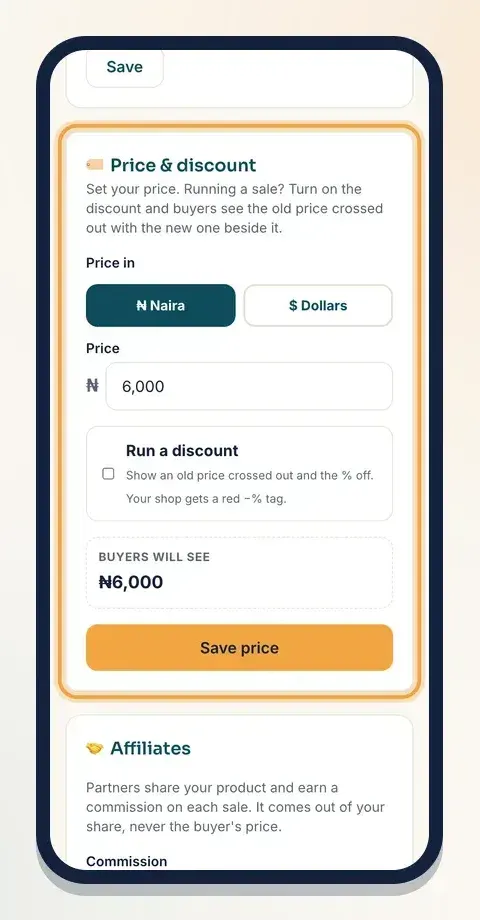
If you switch currency, the box clears so you can type the new price fresh. Older products that had both a naira and a dollar price keep them until you edit and save; after that they have one price like every other product.
Step 3: Run a discount
A discount shows buyers how much they save. It's the same box:
- Tick Run a discount: "Show an old price crossed out and the % off. Your shop gets a red −% tag."
- In Old price ₦ (or Old price $), type the price before the sale. It must be higher than your price.
- Optional: set Discount ends. Buyers see a countdown, and when it ends the price goes back to the old price by itself. The time is Lagos time.
- Check Buyers will see at the bottom. It shows the old price crossed out, the new price and the % off, live as you type.
- Tap Save price.
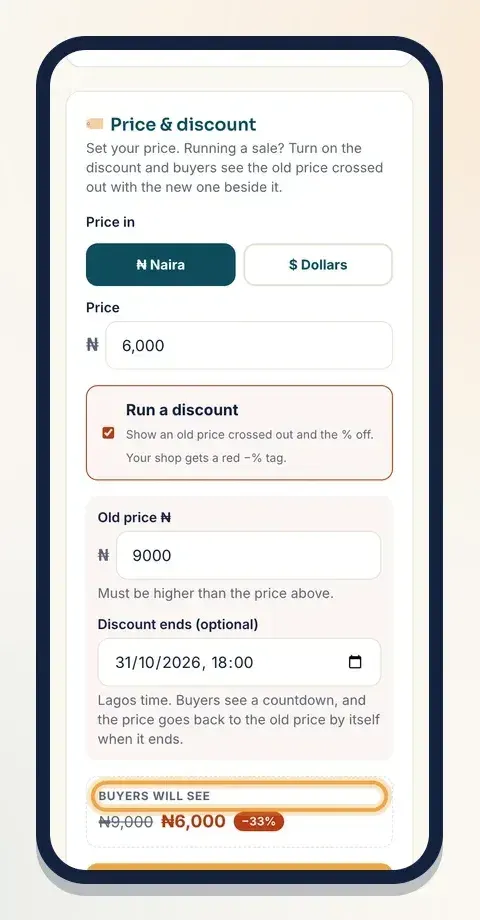
Example: your ebook is usually ₦8,000. Type ₦5,000 as the Price and ₦8,000 as the Old price ₦. Buyers see ₦8,000 crossed out, then ₦5,000, with a −38% tag.
If something is wrong, Klaasi tells you: "The old price must be higher than the new price", or "The end time must be in the future, and there must be an old price to go back to."
What buyers see
On your product page, the buy box shows Was with the old price, the −% tag, your new price and, if you set an end time, a Sale ends in countdown with days, hours, minutes and seconds. In your shop, the product card gets the red −% tag.
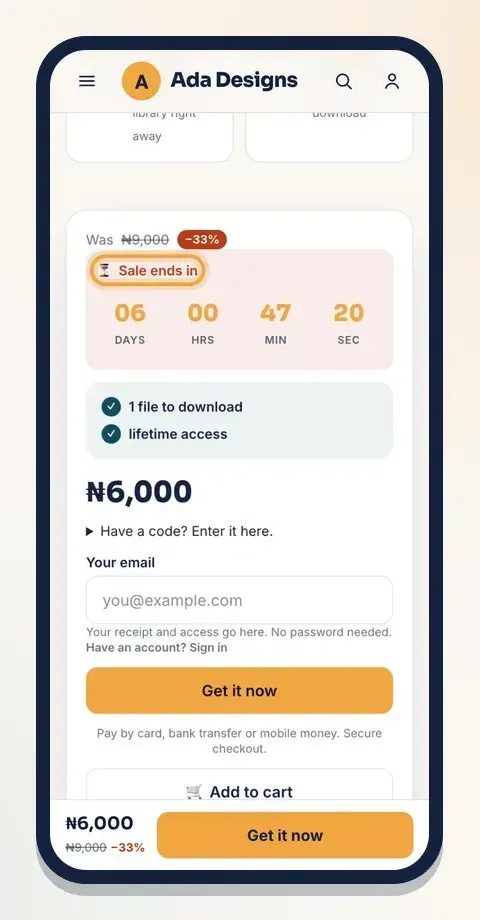
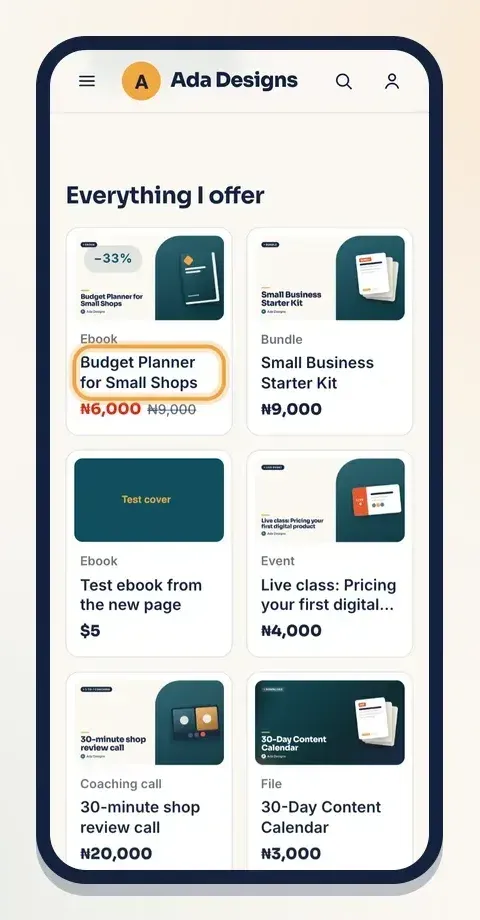
When the sale ends, Klaasi puts the old price back and removes the tag. You don't have to remember to switch it off.
Prices for shop items
If you sell physical products or food, prices live in the product form instead of Selling tools. Open the item from Products and find Price:
- Choose ₦ Naira or $ Dollars and type the price, the same way as above.
- For a discount, type Old price ₦ (shown crossed out) or Old price $ (optional). "Running a discount? Put the old price here. Buyers see it crossed out with your new price and the % off."
- Optional: Discount ends. When it ends, the price goes back to the old price by itself.
- Products with sizes or colours can have their own price per choice in the sizes table.
- Tap Save changes.
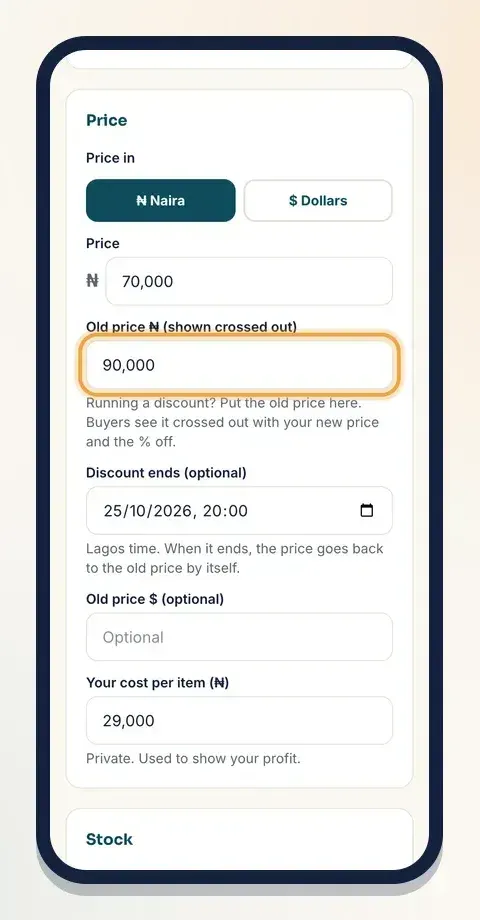
There's also a private Your cost per item (₦) box. Only you see it; it's used to show your profit.
Other ways to price
Klaasi has more pricing tools on Selling tools, each with its own guide:
- Coupon codes like LAUNCH20 for a % off: how to create coupon codes.
- Pay what you want with a minimum, and pay in parts: pay what you want and pay in parts.
- Order bumps and bundles to raise the order total: order bumps and bundles.
Pricing tips
- Price for the result. A guide that helps someone earn or save money can cost more than one that's just "nice to know".
- Use a real old price. Only cross out a price you actually charged. Buyers trust honest discounts.
- Give the sale an end. A countdown helps people decide today instead of "later".
- Keep sales short. A few days around a launch or a holiday works better than a discount that never ends.
- Pick the currency your buyers think in. Most of your buyers in Nigeria? Price in naira. Mostly abroad? Price in dollars.
Questions sellers ask
Can I set a naira price and a different dollar price? No. Each product has one price, in naira or in dollars. Klaasi works out the other one, so your buyers never see two prices that don't match.
Which currency should I choose? The one you think in and want to be paid in. If most of your buyers are in Nigeria, naira is usually easiest. If most are abroad, use dollars.
Do buyers abroad pay more? They pay the dollar amount Klaasi works out from your price. You still get your own price, minus fees.
Can buyers pay with crypto? When crypto checkout is on, buyers can pay in USDT or USDC. Crypto is always paid in dollars: your dollar price, or your naira price converted at Klaasi's rate.
What happens to people who bought before the discount? Nothing changes for them. They keep what they bought. The discount only changes the price for new buyers.
Can I end a discount early? Yes. Open Price & discount, untick Run a discount and tap Save price.
What to do next
- Learn how buyers in other countries pay: how to pay on Klaasi from any country.
- Run a launch with a code: how to create coupon codes.
- See where the money goes after a sale: how to get paid and withdraw.
Start selling on Klaasi, free
Your shop, courses, live classes and community in one place. Buyers pay in naira or dollars.
Open my free shopKeep reading
How to use the Klaasi developer API, webhooks and AI tools (MCP)
Connect your shop to your own website, Zapier, Make or an AI assistant. Create an API key, pick its permissions, receive signed webhooks for every sale and check them safely.
How to handle refunds and support as a seller on Klaasi
Klaasi has one refund policy for every shop. Buyers message Support, you reply with your side, and Klaasi decides using real evidence. Here's how it works and how to answer a refund request.
How to add team members to your Klaasi shop (and what each role can do)
Invite a helper by email and give them the right role: Editor, Support or Finance. Each role sees only what it needs, and only you can move money. Here's how.