How to give paying buyers a private WhatsApp, Telegram or Discord group on Klaasi
Link a private Telegram, Discord or WhatsApp group to your product so only paying buyers get in, and see who to remove when someone is refunded.
Many creators already run their classes, signals or coaching inside a WhatsApp, Telegram or Discord group. The hard part is the admin: checking who paid, sending links, and removing people who asked for a refund. Klaasi does most of that for you. By the end of this guide you'll be able to connect your group to a product, so only paying buyers see the invite, and you'll know what happens when someone loses access.
The pictures use a demo course, "UI design in 30 days" by Ada Designs.
How each app works on Klaasi
The three apps don't all allow the same things, so Klaasi handles them a little differently:
- Telegram: fully automatic. Every paying buyer gets their own one-time invite link. When they join, Klaasi's bot notes who they are. If they're refunded, or they're paying in parts and a part is late, the bot removes them from the group by itself. If they buy again later, they can come back.
- Discord: automatic invites. Every paying buyer gets their own one-time invite to your server. Discord removals need the buyer's own Discord account, so Klaasi lists people who lost access and you remove them yourself.
- WhatsApp: a protected link. WhatsApp doesn't let apps add or remove members. Klaasi shows your group link only to paying buyers, and gives you a list of people to remove when they lose access.
One-time invites for Telegram and Discord work once and expire after 7 days, so a link that gets shared around is useless to anyone else.
You can use one app, two, or all three on the same product. Groups work on digital products like courses, ebooks, files, live classes and coaching.
Step 1: Connect your Telegram or Discord bot
You only do this once for your whole shop. WhatsApp needs nothing here; skip to Step 2 if WhatsApp is all you use.
Open More tools → Integrations in your dashboard (only the shop owner can see it). At the top is Private groups.
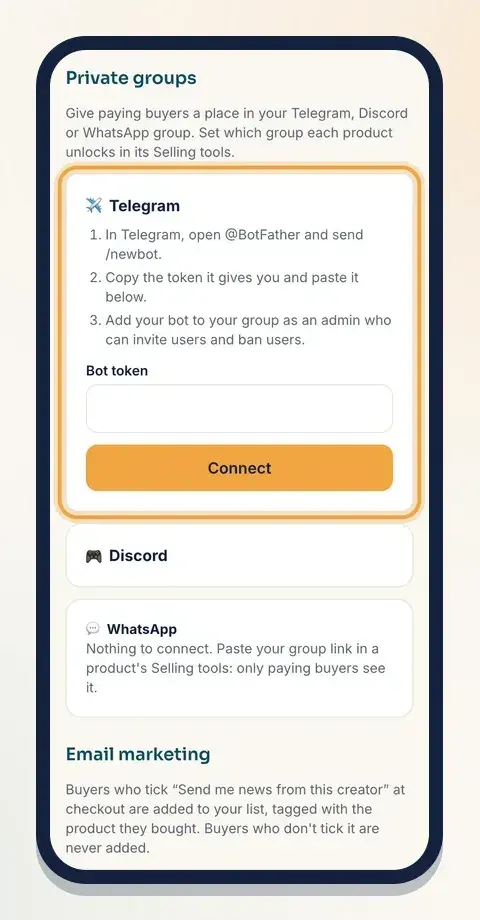
For Telegram:
- In Telegram, open @BotFather and send /newbot. Follow its questions to name your bot.
- BotFather gives you a token (a long code). Copy it.
- On Klaasi, open Telegram, paste it into Bot token and tap Connect.
- In Telegram, add your bot to your group as an admin who can invite users and ban users.
For Discord:
- Go to discord.com/developers, choose New Application, open Bot, and copy the token.
- Invite the bot to your server with the Create Invite permission.
- On Klaasi, open Discord, paste the token into Bot token and tap Connect.
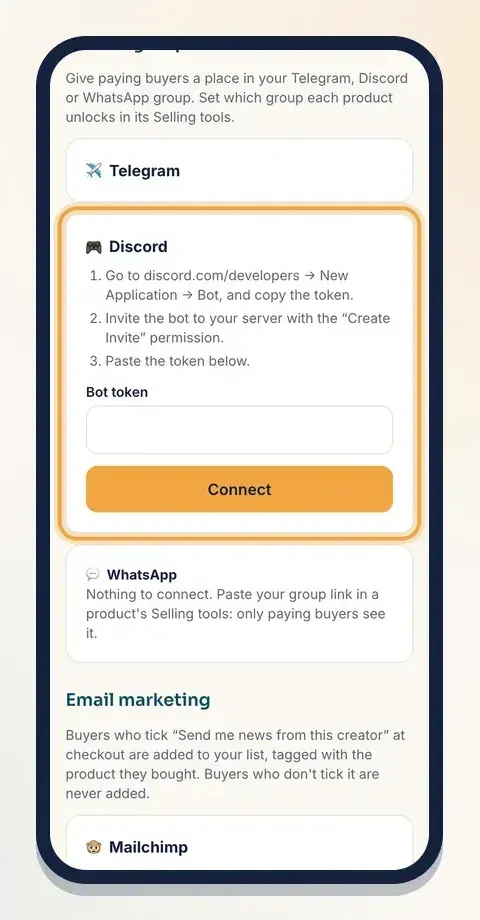
Your token is stored encrypted and only used for your groups. If the token is wrong, Klaasi says "That bot token didn't work" so you can copy it again. Once connected, you'll see Connected, and you can Update or Disconnect any time.
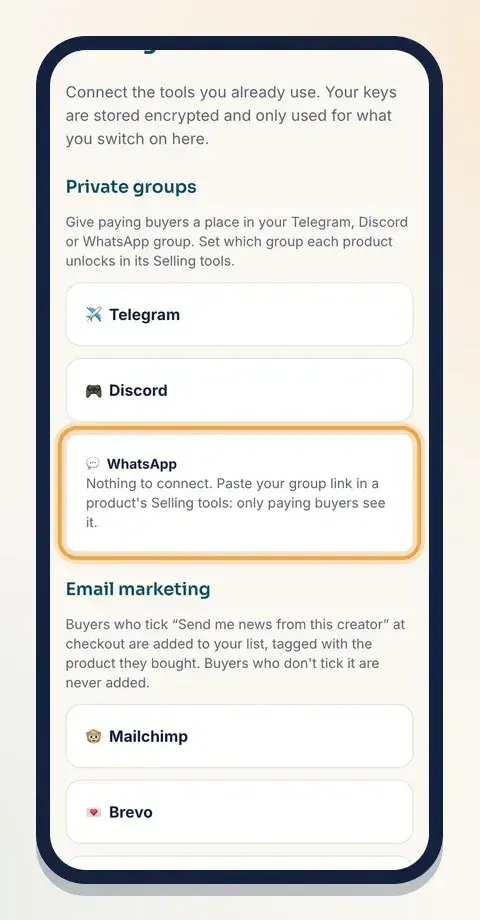
For WhatsApp: there's nothing to connect. The card simply reminds you to paste your group link in a product's Selling tools.
Step 2: Link the group to your product
Now tell Klaasi which group each product unlocks.
- Go to Products and tap Selling tools on the product.
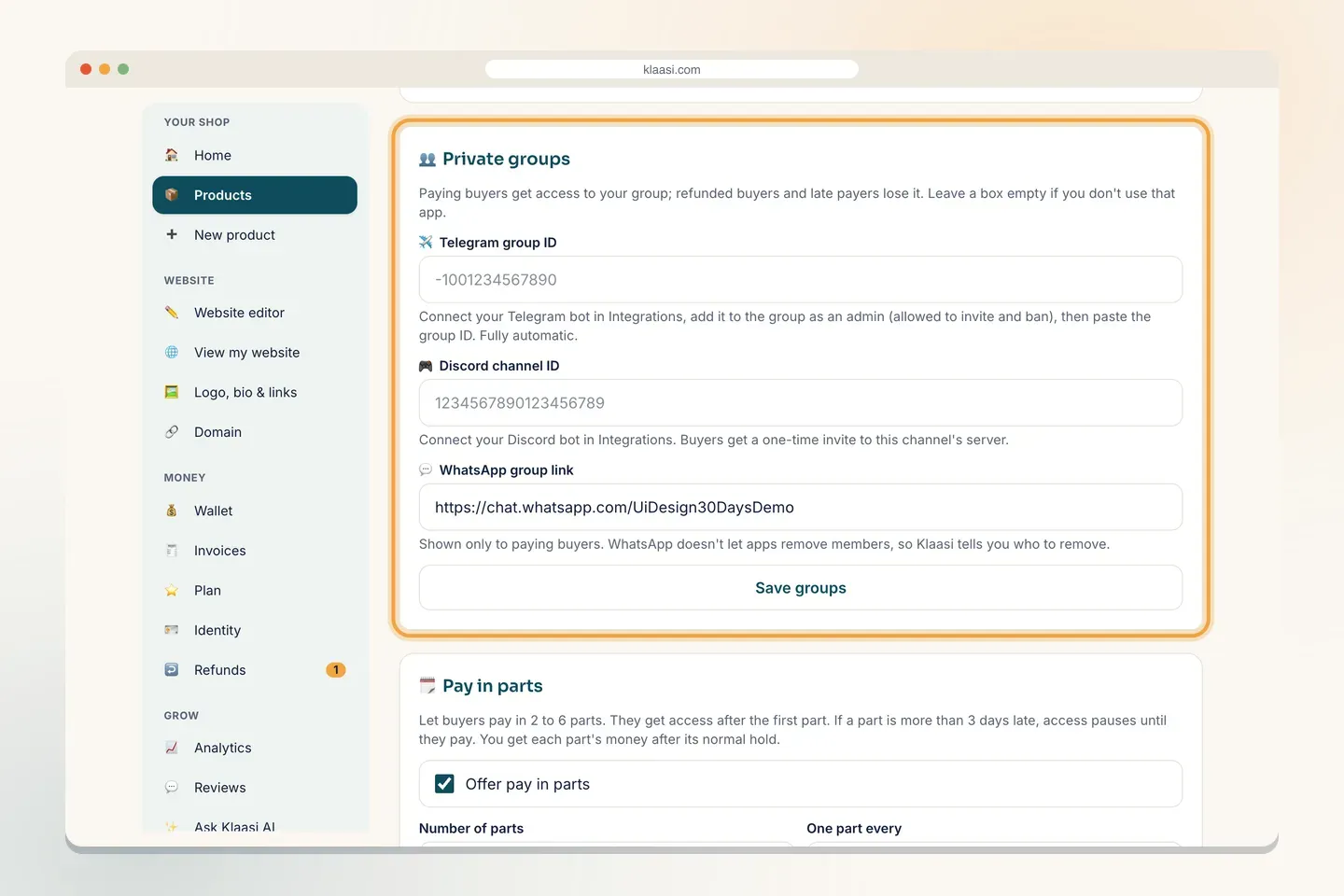
- Scroll to 👥 Private groups.
- Fill in the box for each app you use. Leave a box empty if you don't use that app:
- Telegram group ID: your group's number ID, which starts with -100 (for example -1001234567890).
- Discord channel ID: the long number ID of a channel on your server.
- WhatsApp group link: the invite link from WhatsApp, starting with https://chat.whatsapp.com/.
- Tap Save groups.
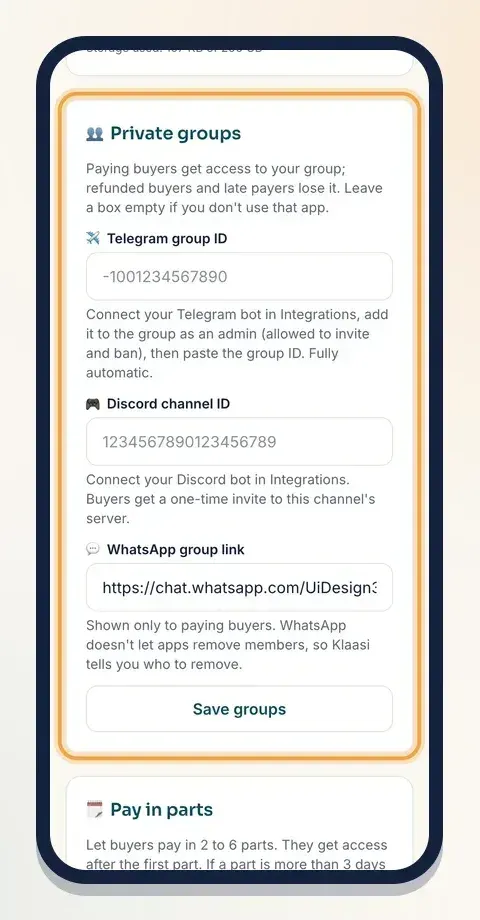
If something doesn't look right, you'll see "Check the group ID, channel ID or WhatsApp link". The most common mistake is pasting a WhatsApp link that isn't a group invite link.
On a computer the same box is wider and easier to fill:
Important: set up your group before you start selling. Invites are made at the moment someone buys, so people who bought before you saved the group won't get a link automatically. Send those earlier buyers the link yourself.
Step 3: What your buyer sees
After paying, the buyer opens their library. On the product's card, under the main button, they see Join WhatsApp group (or the Telegram or Discord invite). They tap it and join. Nobody else can see that button.
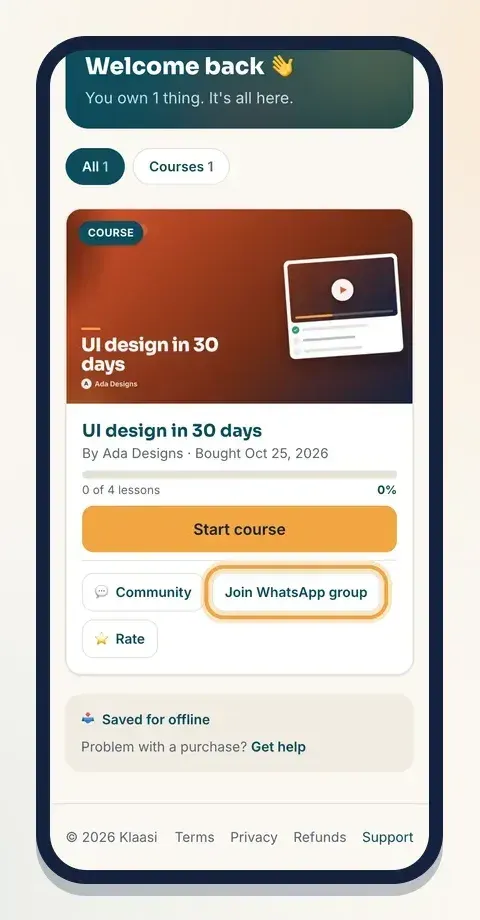
To see the whole buyer journey, read How to buy on Klaasi and find your library.
Step 4: When someone loses access
A buyer loses access when they are refunded. If you offer pay in parts, a buyer whose part is more than 3 days late is paused until they pay. Here's what happens to their group place:
- Telegram: the bot removes them by itself. If they hadn't joined yet, their invite is cancelled. If they pay a late part, they get a fresh invite.
- Discord and WhatsApp: their name appears on the product's Selling tools, in the Private groups box, under Lost access: remove them from the group. Open your group, remove that person, then tap I removed them so the list stays tidy.
Check that list every time you get a refund alert. It only takes a minute and keeps your group fair for the people who paid.
Pay in parts is explained in How to use pay what you want and pay in parts.
Group or community?
Klaasi also has its own built-in community for courses, with posts, replies, points, levels and a leaderboard. Buyers don't need another app, and refunded buyers are removed automatically. Many creators use both: the Klaasi community for questions and progress, and a WhatsApp or Telegram group for quick announcements. See How to build a community for your course.
Tips
- Turn off "anyone can add members" in your WhatsApp group settings, so only admins can add people.
- Reset your WhatsApp invite link now and then, and paste the new one in Private groups. Old links that were shared outside stop working.
- Make your Telegram group private. Public groups can be found and joined without an invite.
- Pin a welcome message in the group with your rules and where to find the course.
Common questions
Can I use the same group for two products? Yes. Paste the same group ID or link on both products. Each buyer gets their own invite either way.
What if a buyer says the invite link doesn't work? Telegram and Discord invites work once and expire after 7 days. If a buyer waited too long or the link was used by someone else, add them to the group yourself after checking their order in your dashboard.
Do buyers need to share their phone number with me? Not through Klaasi. For WhatsApp, the buyer joins with their own number through your group link, the same way they'd join any group.
What does the bot do in my group? Klaasi only uses it to create invites, note who joined through them, and remove people who lost access. It doesn't post anything.
What to do next
Start selling on Klaasi, free
Your shop, courses, live classes and community in one place. Buyers pay in naira or dollars.
Open my free shopKeep reading
How to use the Klaasi developer API, webhooks and AI tools (MCP)
Connect your shop to your own website, Zapier, Make or an AI assistant. Create an API key, pick its permissions, receive signed webhooks for every sale and check them safely.
How to handle refunds and support as a seller on Klaasi
Klaasi has one refund policy for every shop. Buyers message Support, you reply with your side, and Klaasi decides using real evidence. Here's how it works and how to answer a refund request.
How to add team members to your Klaasi shop (and what each role can do)
Invite a helper by email and give them the right role: Editor, Support or Finance. Each role sees only what it needs, and only you can move money. Here's how.