How to use pay what you want and pay in parts on Klaasi
Let buyers choose their own price above a minimum, or let them pay for a bigger product in 2 to 6 parts. Here's how both work and how to switch them on.
Not every buyer has the full price today. Some would happily pay more than you ask, if you let them. Klaasi has two tools for this:
- Pay what you want: the buyer types their own price. You set the minimum.
- Pay in parts: the buyer pays part of the price today, gets access straight away, and pays the rest over the next weeks.
By the end of this guide you'll know when to use each one, how to switch them on, what your buyers see, and what happens if someone pays a part late.
Part 1: Pay what you want
When to use it
Pay what you want works well for:
- A first ebook or template, when you're building your audience.
- A "support my work" product, like a recording of a free class.
- Students and fans who want to pay more because they like what you do.
It's on every plan, Free included.
Step 1: Open Selling tools
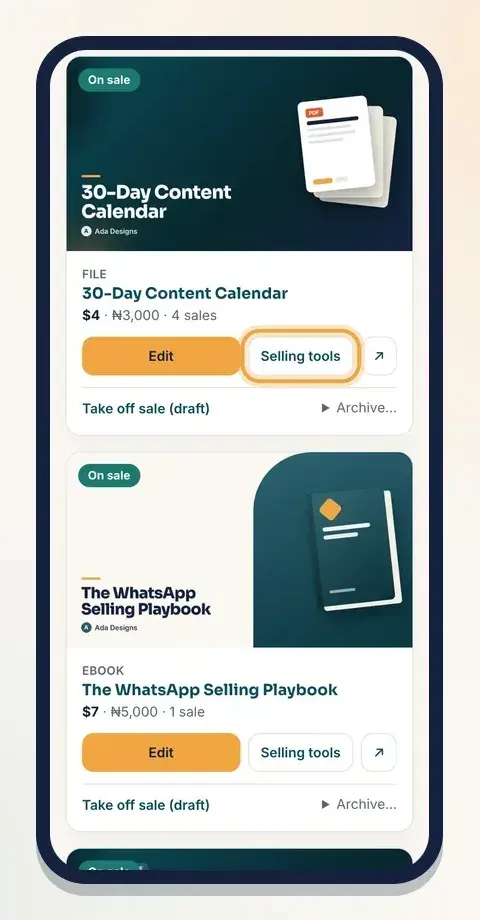
- Open your dashboard and tap Products.
- Find the product and tap Selling tools.
- Scroll to the Pay what you want box.
Step 2: Set the minimum
The box says: Let buyers choose the price. They must pay at least the minimum.
- In the field Minimum in naira (empty = fixed price) (or Minimum in dollars (empty = fixed price) if your price is in dollars), type the lowest amount you'll accept. For example 1500 in naira, or 2 in dollars. Check the label first, so you type the amount in the right money.
- Tap Save.
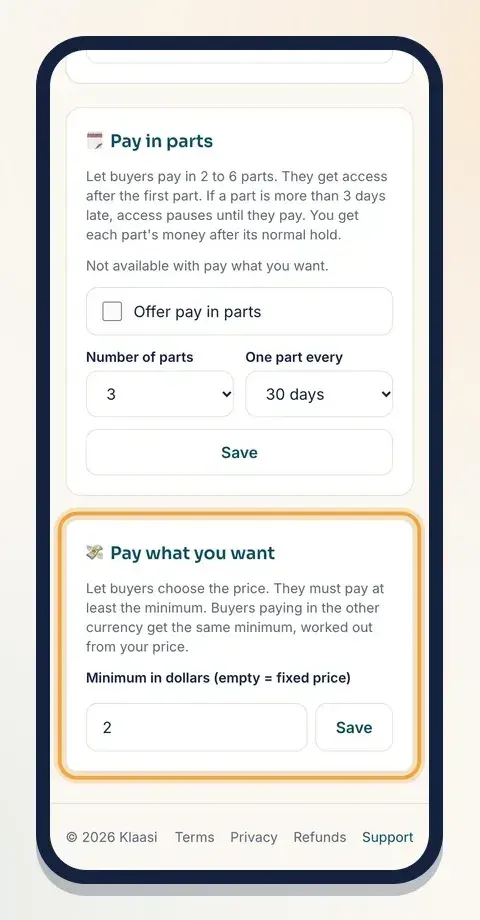
Your normal price stays the suggested amount. A buyer can keep it, pay more, or pay less, but never below your minimum.
The minimum is in the same money as your price. Buyers who pay in the other currency get the same minimum, worked out from your price. So if you sell in naira, a buyer abroad sees a dollar minimum that matches.
To go back to a fixed price, clear the box and tap Save again.
Step 3: What buyers see
On your product page, above the buy button, buyers now see a Pay what you want box with your price already filled in, and a small line under it saying At least and your minimum.
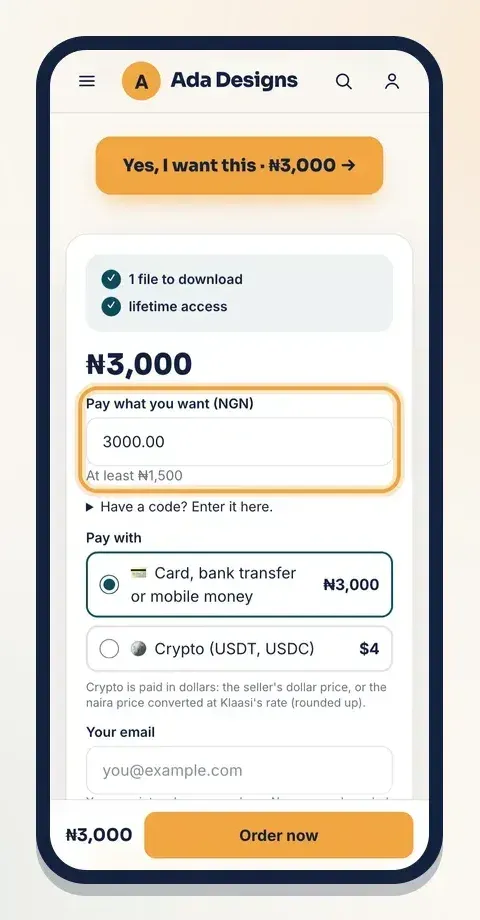
If they type less than the minimum, they see Please pay at least the minimum. and nothing is charged.
Tip: say why a higher price helps in your description, like "Pay more if this saves you time. It helps me make the next one."
Part 2: Pay in parts
When to use it
Pay in parts (also called instalments) is best for bigger products: a full course, a coaching programme, a membership or a bundle. A buyer who can't pay ₦60,000 today may happily pay ₦20,000 now and the rest over the next two months.
Pay in parts is on the Pro and Business plans. On the Free plan, the box tells you Pay in parts is on the Pro and Business plans. and you can't switch it on yet.
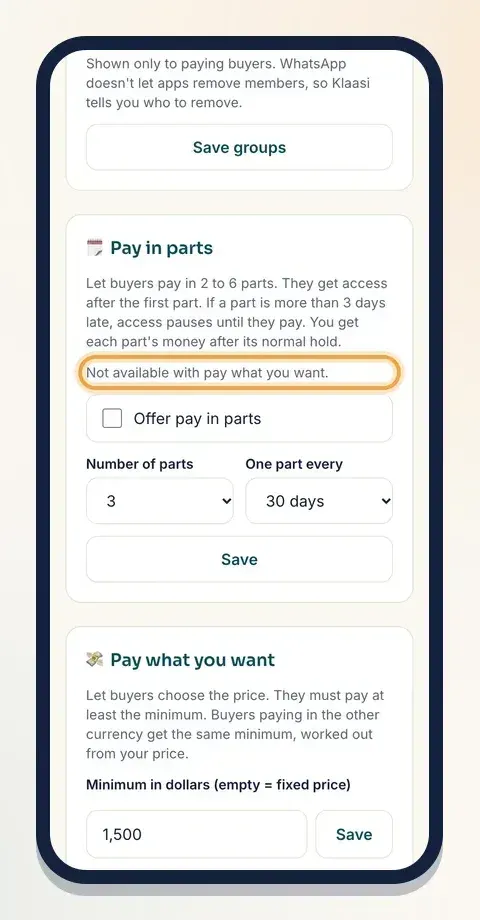
Step 1: Switch it on
- Open the product's Selling tools.
- Find the Pay in parts box.
- Tick Offer pay in parts.
- Pick the Number of parts: 2, 3, 4, 5 or 6.
- Pick One part every: 7 days, 14 days or 30 days.
- Tap Save.
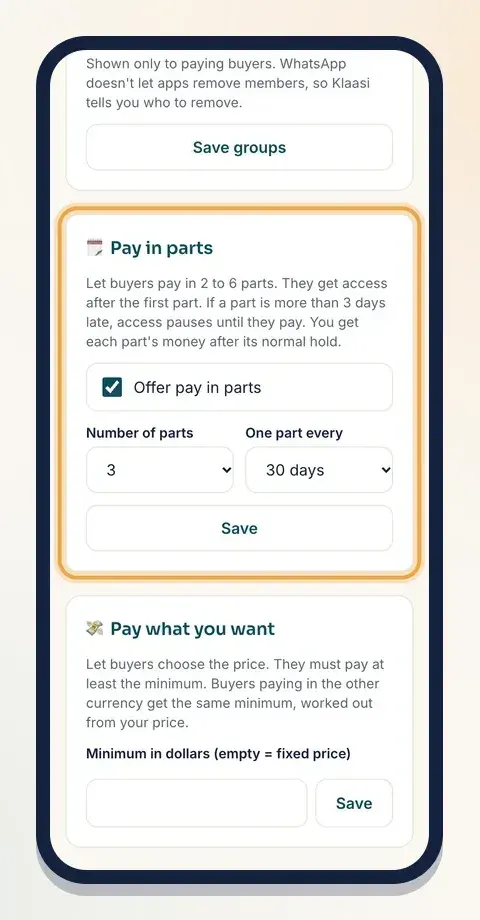
The box reminds you how it works: They get access after the first part. If a part is more than 3 days late, access pauses until they pay. You get each part's money after its normal hold.
Pay in parts and pay what you want don't mix. If a product has a pay-what-you-want minimum, the Pay in parts box says Not available with pay what you want. Clear the minimum first if you want to offer parts.
Step 2: What buyers see
Your product page now asks How do you want to pay? with two choices:
- Pay in full with the full price.
- Pay in 3 parts (or however many you chose), with a line like "₦20,000 today, then ₦20,000 every 30 days (2 more)".
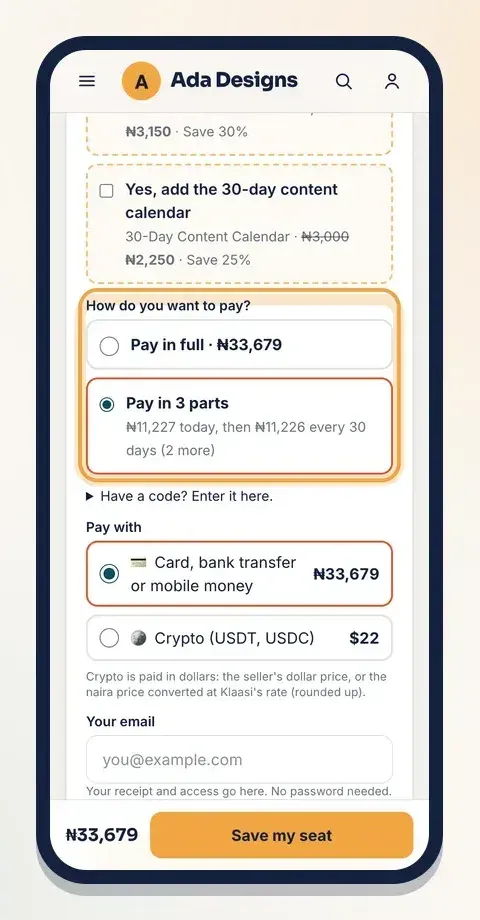
Klaasi splits the total into equal parts. If it doesn't divide evenly, the first part takes the few extra naira or cents, so the parts always add up to exactly the price.
A buyer who picks parts pays the first part at checkout and gets access straight away, the same as a buyer who paid in full.
Pay in parts is for one product at a time. It isn't offered when a buyer pays for several products together in a cart.
Step 3: How the next parts get paid
Each later part is its own payment, so it works with any way your buyers pay, including bank transfer and mobile money. Klaasi doesn't charge their card by itself.
Here's what happens with each part:
- Up to 3 days before it's due, the buyer gets an email and a notification: "Part 2 for your product is due soon", with a link to pay.
- On the due date, if it isn't paid, they get "part due now". The email says that access pauses if it isn't paid within 3 days.
- More than 3 days late, their access to the product is paused. If the product gives access to a private WhatsApp, Telegram or Discord group, they're also put on the list to be removed. They get one more email: "Access to your product is paused".
- As soon as they pay, access comes back.
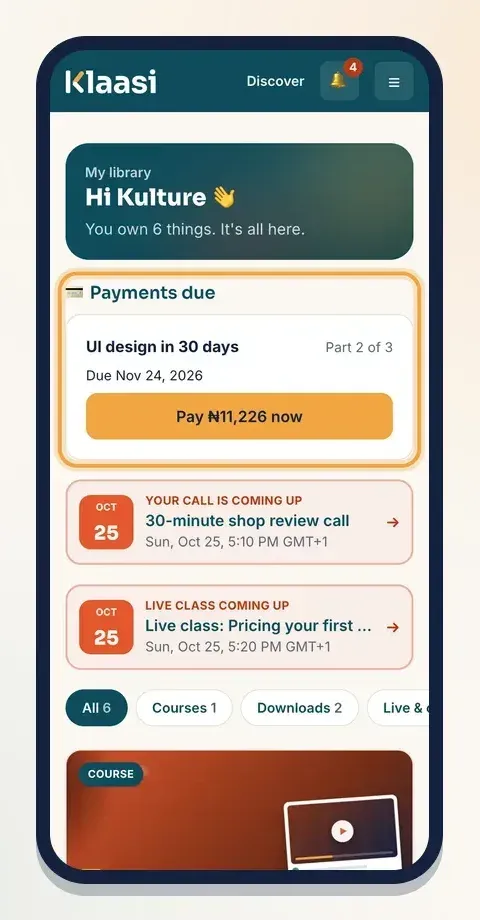
Buyers pay each part from their Library. Under Payments due they see which part it is, when it's due, and a button like Pay ₦20,000 now.
Step 4: How you get paid
Each part is a sale of its own in your wallet, marked Sale (part payment). Klaasi's normal fee is taken from each part, and each part's money becomes available to withdraw after the usual hold, counted from the day that part was paid. You don't wait for the last part to get the first part's money.
See how to get paid and withdraw for how holds and withdrawals work.
Which one should I choose?
- Cheap product, growing audience: pay what you want.
- Expensive product, buyers who want it but need time: pay in parts.
- A launch price for everyone: a discount instead. See how to set prices and discounts.
Common questions
Can I use a coupon with pay in parts? Yes. The coupon comes off the price first, and the lower total is split into parts.
What if a buyer never pays the last part? Their access stays paused until they pay. You keep the money from the parts they already paid.
Can I change the number of parts later? Yes. Change it and tap Save. New buyers get the new plan; people who already started keep the parts they agreed to.
What to do next
- Upgrade to use pay in parts: How to choose and upgrade your Klaasi plan
- Add a second product at checkout: How to add order bumps and bundles
- Give a private discount: How to create coupon codes on Klaasi
Start selling on Klaasi, free
Your shop, courses, live classes and community in one place. Buyers pay in naira or dollars.
Open my free shopKeep reading
How to use the Klaasi developer API, webhooks and AI tools (MCP)
Connect your shop to your own website, Zapier, Make or an AI assistant. Create an API key, pick its permissions, receive signed webhooks for every sale and check them safely.
How to handle refunds and support as a seller on Klaasi
Klaasi has one refund policy for every shop. Buyers message Support, you reply with your side, and Klaasi decides using real evidence. Here's how it works and how to answer a refund request.
How to add team members to your Klaasi shop (and what each role can do)
Invite a helper by email and give them the right role: Editor, Support or Finance. Each role sees only what it needs, and only you can move money. Here's how.