How to sell coaching calls on Klaasi (booking, payment and video call in one place)
Sell 1-to-1 calls that people book and pay for in one step. Add your free times, let buyers pick one, and meet in a private video call room on Klaasi.
If people already ask you for advice, you can charge for it. Coaching, consulting, mentoring, shop reviews, CV reviews, tutoring: they are all 1-to-1 calls. On Klaasi, the booking, the payment and the video call happen in one place. You don't need a separate calendar app or a meeting link.
This guide shows you how to create a coaching product, add the times you're free, what buyers see when they book, how the private call room works, and how buyers can change their time.
How it works in one minute
- You create a Coaching call product and set a price.
- You add the times you're free.
- A buyer picks a time and pays in the same step. That time is now theirs.
- Both of you get email reminders.
- At the time, you both tap Join the call and meet in a private video room on Klaasi.
Step 1: Create the coaching product
- Open your dashboard and tap New product.
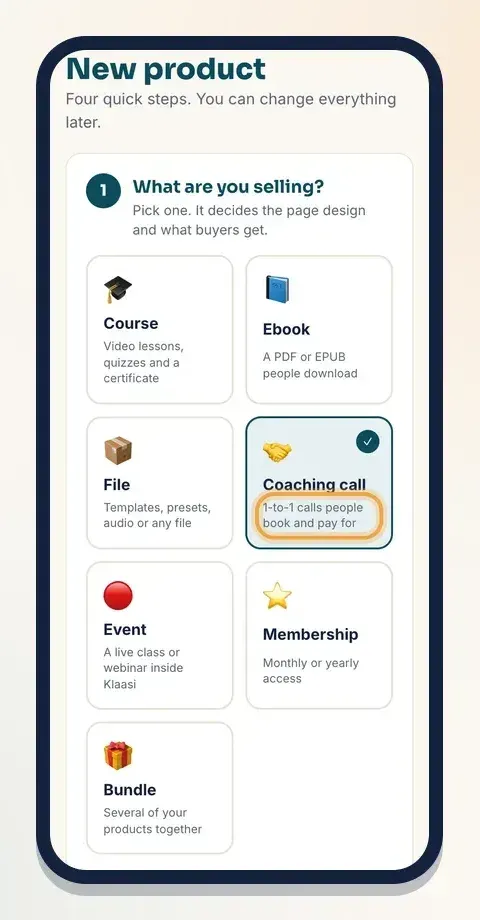
- Under What are you selling?, tap Coaching call: "1-to-1 calls people book and pay for".
- Type a Title that says the result, like "Get honest eyes on your shop", and a Description of what you'll cover in the call.
- Under Set your price, choose ₦ Naira or $ Dollars and type one price. Klaasi works out the other currency for buyers abroad or in Nigeria.
- Choose Who pays the Klaasi fee? and tap Create product.
Step 2: Add the times you're free
Right after you create it, Klaasi opens Page design for your product. Scroll down to Coaching times.
- In Date and time, pick when you're free.
- In Minutes, set how long the call is: from 15 to 240 minutes, in steps of 15. The starting value is 45.
- Tap Add time. Repeat for every time you want to offer.
Times are in your own time zone. Buyers see each time in theirs, so a buyer in Nairobi and a buyer in London both see the right time.
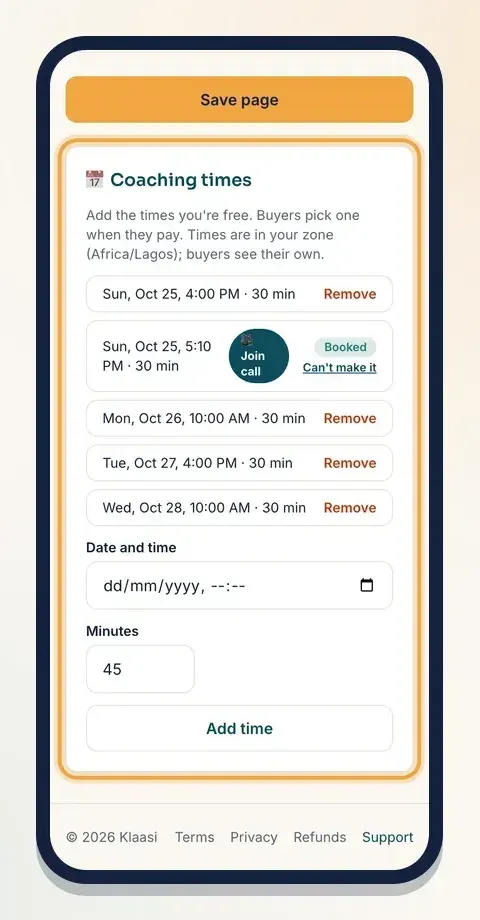
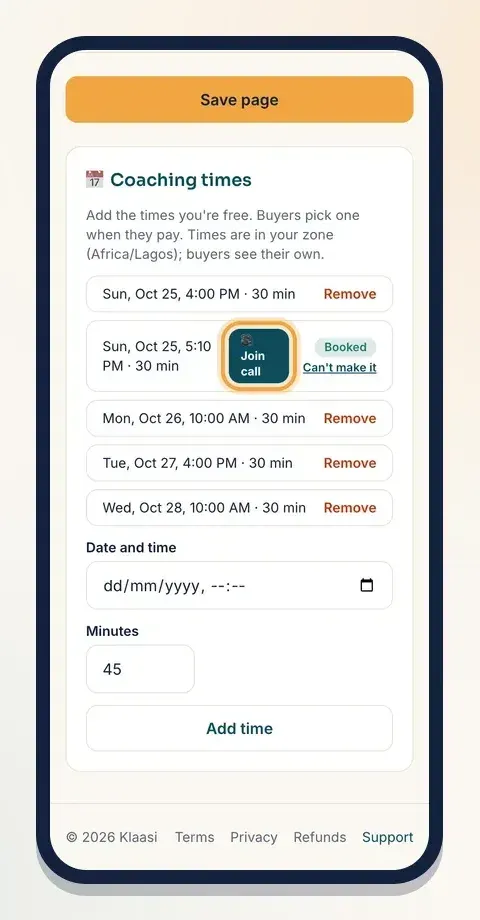
Each time can be booked by one buyer. When someone books it, it shows Booked. An open time you no longer want can be taken off with Remove.
No times added? Buyers can still pay, and then you agree a time with them yourself. Adding times is easier for everyone.
Step 3: Make the page feel personal
On the same Page design page, pick the Coaching theme under Theme. Klaasi marks it Best for this product. It shows your photo, your bookable times and what the session includes. The other themes and your brand colour are on Pro and Business; Classic works on every plan.
In Words on your page, fill in What buyers get or learn, one per line. For example:
- We review your product page and price together
- You get three changes to make this week
- A short written summary after the call
Add a few Questions and answers, like "Where is the call? | In a private video room on Klaasi. No app needed." Tap Save page.
Step 4: What buyers see when they book
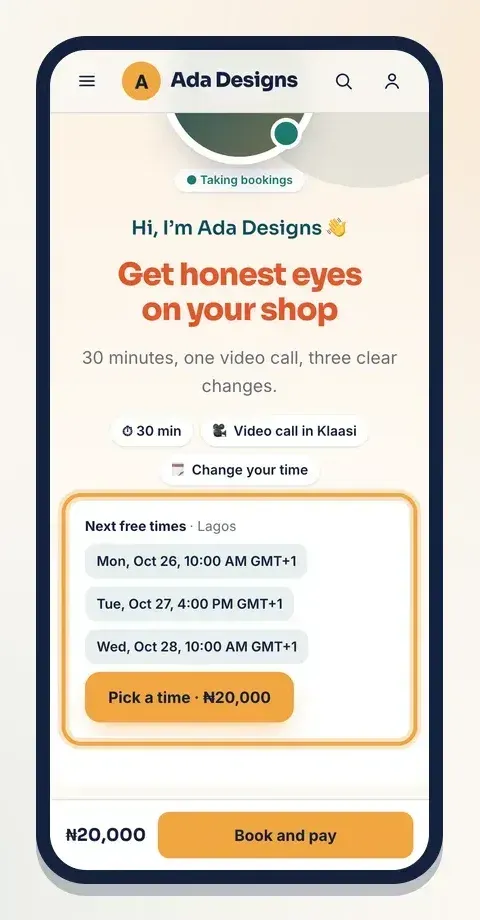
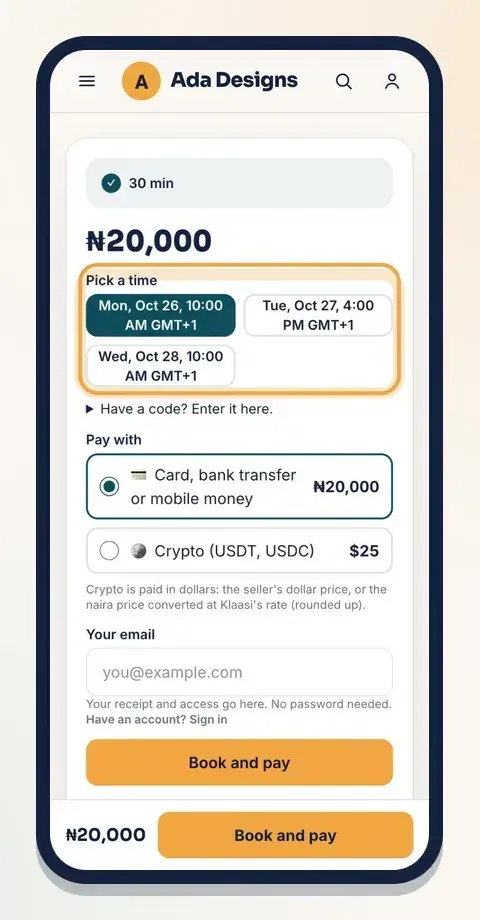
On your page, buyers see your next free times. In the buy box they tap the time that suits them under Pick a time, type their email (or sign in), and tap Book and pay. Their time is booked as soon as the payment goes through, so two people can never take the same time.
After paying, the thank-you page shows the booked time with See or change your call. The call also shows in My library under Live & calls, with See my call.
Step 5: Changing the call time
Life happens. Klaasi lets buyers move their own call, within fair limits:
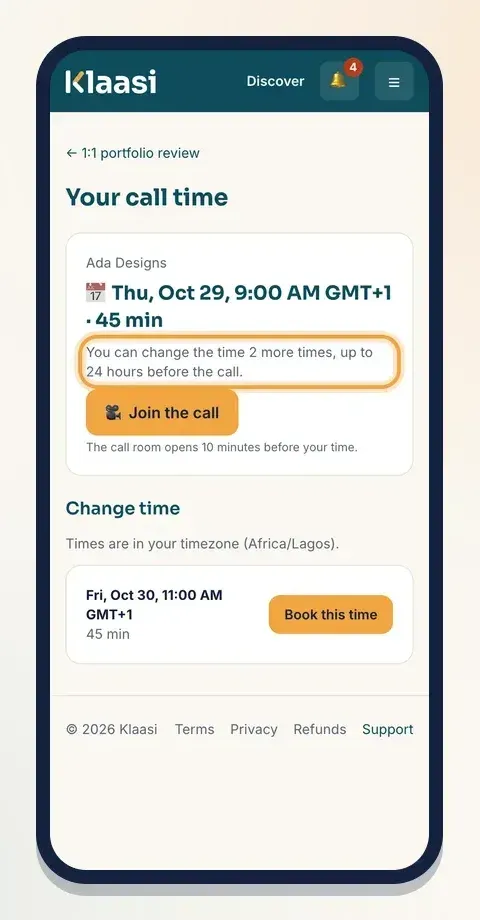
- They can change the time up to 24 hours before the call.
- They can change it 2 times.
On their call page, the buyer taps Change time, picks one of your open times and taps Book this time. The page tells them how many changes they have left. If the call is less than 24 hours away, or they've used both changes, the page asks them to message you through Support instead.
If you can't make it: on Coaching times, tap Can't make it next to the booked time, type Why (the buyer sees this) and tap Free this time. The buyer is told and asked to pick another time.
Step 6: Reminders
Klaasi emails both you and the buyer 24 hours before the call and again 1 hour before. Each email has the time in that person's time zone and the link to the call room.
Step 7: Join the private call room
Every booked call has its own private room. Only the buyer and you (or your shop team) can enter it.
- The room opens 10 minutes before the call and closes 30 minutes after the planned end.
- The buyer joins from their call page with Join the call.
- You join from Coaching times, where each upcoming booked time has a Join call button.
- Both of you start on camera. The Mic and Camera buttons show On or Off, and on a computer you, the coach, can tap Share screen to look at a website or document together.
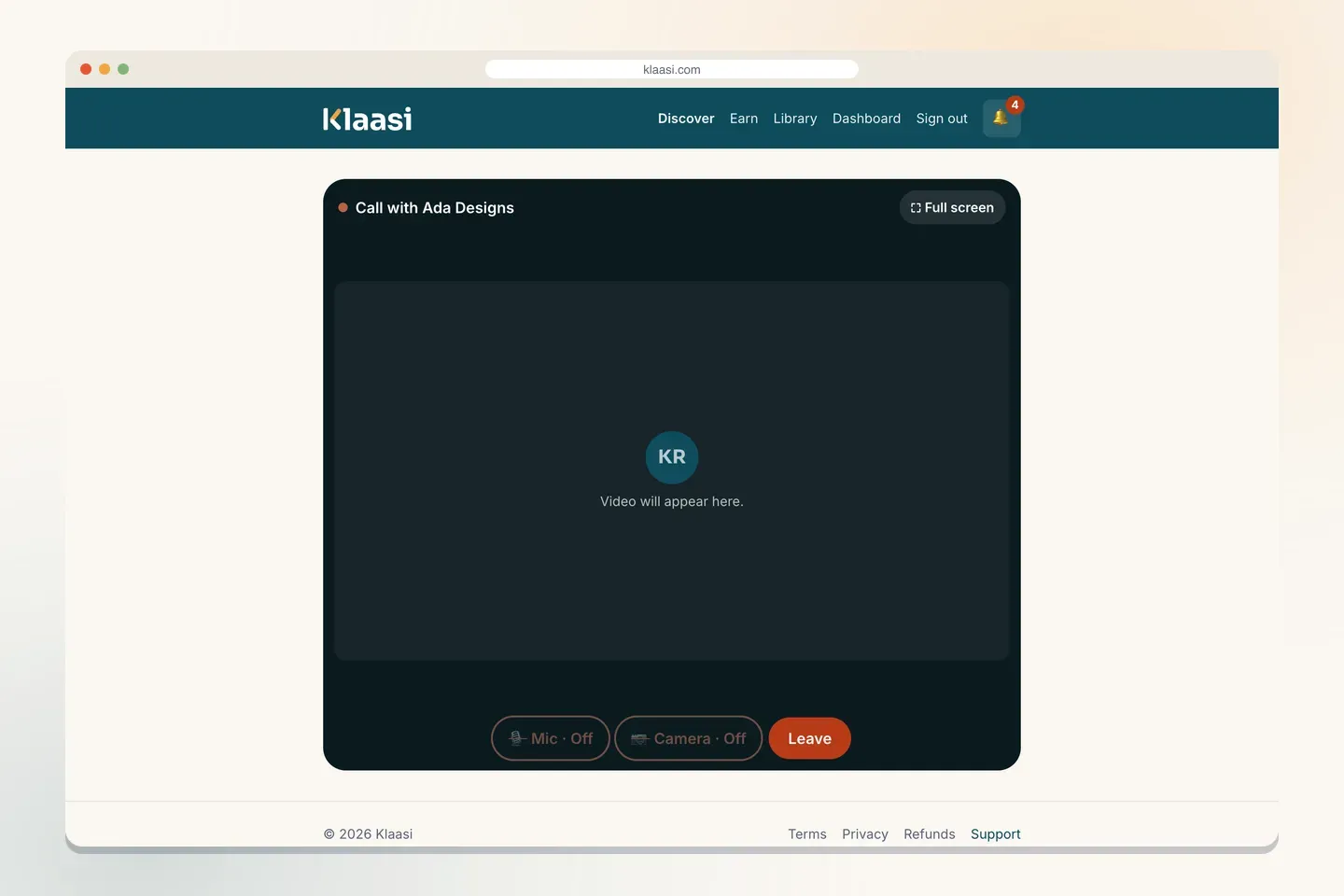
It all runs in the browser on a phone or computer. There's nothing to install.
How to run a great call
The booking is easy; the call itself is what brings buyers back and makes them tell their friends. A few habits help:
- Check who booked before the call. The booking is in your orders with the buyer's name. If they wrote to you through Support, read that too.
- Join a few minutes early. The room opens 10 minutes before the time, so you're ready when they arrive.
- Start with one question: "What do you most want to leave this call with?" Then keep to it.
- Share your screen when you're looking at their shop, CV or website together. It saves a lot of explaining.
- End with clear next steps. Say the three things they should do this week, and send a short summary afterwards if you promised one.
- Keep to time. If the call needs more, offer another booking instead of running over.
Good to know
- Each booked time belongs to one buyer, so you're never double-booked.
- A refunded buyer can no longer open the call room.
- Your team members can also open your shop's call rooms, which helps if an assistant joins you.
- Money from each booking goes to your wallet like any other sale.
Ideas for coaching products
- Reviews: shop review, CV review, portfolio review, business plan review.
- Lessons: music, languages, maths tutoring, fitness check-ins.
- Consulting: pricing, marketing, a website plan, a money plan for a small business.
- Packages: sell a "3 calls" product and add three times for each buyer, or let them book again.
Tips for more bookings
- Keep a few times open every week. An empty calendar looks like you're not available.
- Say exactly what happens in the call and what they leave with.
- Use your real face. The Coaching theme puts your photo first; people book people.
- Add an intro video of you explaining the call: see how to add an intro video.
What to do next
- Teach many people at once with a paid live class.
- Make your page stand out: how to design your product page.
- Get paid to your bank: how to get paid and withdraw.
Start selling on Klaasi, free
Your shop, courses, live classes and community in one place. Buyers pay in naira or dollars.
Open my free shopKeep reading
How to use the Klaasi developer API, webhooks and AI tools (MCP)
Connect your shop to your own website, Zapier, Make or an AI assistant. Create an API key, pick its permissions, receive signed webhooks for every sale and check them safely.
How to handle refunds and support as a seller on Klaasi
Klaasi has one refund policy for every shop. Buyers message Support, you reply with your side, and Klaasi decides using real evidence. Here's how it works and how to answer a refund request.
How to add team members to your Klaasi shop (and what each role can do)
Invite a helper by email and give them the right role: Editor, Support or Finance. Each role sees only what it needs, and only you can move money. Here's how.